Welcome to another edition of the Code Cookbook! Today, we are serving up a complete, mouth-watering recipe for a modern, responsive web-based music player built using HTML5, CSS3, and Vanilla JavaScript.
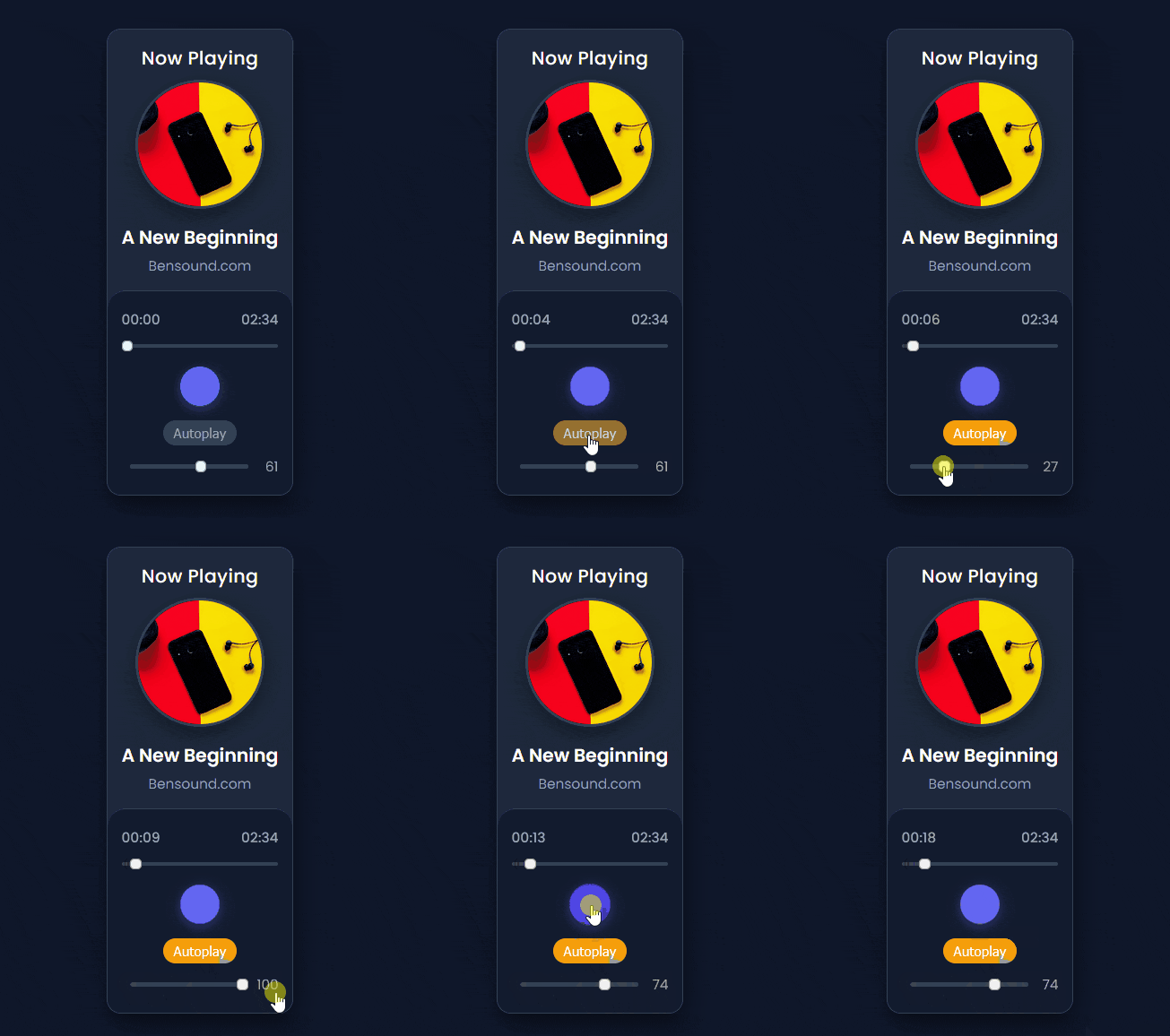
Whether you are looking to build a portfolio project or add an interactive multimedia element to your website, this clean and lightweight component offers everything from live track sliders and volume controls to a smooth, slide-out playlist drawer.
<!DOCTYPE html>
<html lang="en">
  <head>
    <meta charset="UTF-8" />
    <meta name="viewport" content="width=device-width, initial-scale=1.0" />
    <title>Modern Music Player</title>
    <!-- FontAwesome for icons -->
    <script
      src="https://kit.fontawesome.com/1935d064dd.js"
      crossorigin="anonymous"
    ></script>
    <link rel="stylesheet" href="styles.css" />
  </head>
  <body>
    <!-- Main Wrapper Section -->
    <section class="main">
      <div class="container box">
        <div class="music">
          <!-- Main Music Player Card -->
          <div class="music-player">
            <!-- Header Section with Playlist Toggle -->
            <div class="header">
              <i class="fas fa-music"></i>
              <h2>Now Playing</h2>
              <i class="fas fa-bars" id="menu-btn" title="Open Playlist"></i>
            </div>

            <!-- Song Details & Album Art -->
            <div class="details">
              <div class="img-area">
                <img class="track-image" src="./images/img1.jpg" alt="Track Image" />
              </div>
              <p class="title">Song Title</p>
              <p class="artist">Artist Name</p>
            </div>

            <!-- Player Controls Section -->
            <div class="controls">
              <!-- Current Time and Duration Display -->
              <div class="song-timer">
                <span class="current-time">00:00</span>
                <span class="duration-time">00:00</span>
              </div>

              <!-- Track Progress Bar Slider -->
              <div class="duration">
                <input
                  type="range"
                  class="duration-slider"
                  min="0"
                  max="100"
                  value="0"
                />
              </div>

              <!-- Playback Control Buttons (Previous, Play/Pause, Next) -->
              <div class="buttons">
                <button class="prev" title="Previous Song">
                  <i class="fas fa-step-backward"></i>
                </button>
                <button class="play" title="Play/Pause">
                  <i class="fas fa-play" style="margin-left: 3px;"></i>
                </button>
                <button class="next" title="Next Song">
                  <i class="fas fa-step-forward"></i>
                </button>
              </div>

              <!-- Autoplay Mode Toggle -->
              <div class="extra-controls">
                <button class="play-all" title="Toggle Autoplay">
                  Autoplay <i class="fas fa-sync-alt"></i>
                </button>
              </div>

              <!-- Volume Adjustment Control -->
              <div class="volume">
                <i class="fas fa-volume-up" id="volume-icon" title="Mute/Unmute"></i>
                <input type="range" id="volume" min="0" max="100" value="50" />
                <span id="show-volume">50</span>
              </div>
            </div>
          </div>

          <!-- Slide-out Playlist Panel -->
          <div class="music-playlist">
            <div class="header playlist-header">
              <i class="fas fa-music"></i>
              <h2>Playlist</h2>
              <i class="fas fa-times" id="close-btn" title="Close Playlist"></i>
            </div>
            <!-- Dynamic Playlist Container -->
            <div class="playlist-div">
              <!-- Playlist items will be injected here via JavaScript -->
            </div>
          </div>
        </div>
      </div>
    </section>

    <!-- External Track List & Player Logic Scripts -->
    <script src="music.js"></script>
    <script src="script.js"></script>
  </body>
</html>/* Import Google Fonts - Poppins */
@import url("https://fonts.googleapis.com/css2?family=Poppins:wght@300;400;500;600;700&display=swap");
/* CSS Color Variables and Theme Configuration */
:root {
--white: #ffffff;
--black: #121212;
--primary: #6366f1;
--primary-hover: #4f46e5;
--accent: #f59e0b;
--bg-dark: #0f172a;
--card-bg: #1e293b;
--text-gray: #94a3b8;
--border-color: #334155;
}
/* Global Reset & Box Sizing */
* {
margin: 0;
padding: 0;
box-sizing: border-box;
}
/* Base Body Styling */
body {
font-family: "Poppins", sans-serif;
background: var(--bg-dark);
color: var(--white);
min-height: 100vh;
display: flex;
justify-content: center;
align-items: center;
}
/* Main Container Layout */
.container {
width: 100%;
max-width: 400px;
padding: 20px;
}
/* Music Card Wrapper */
.music {
position: relative;
background: var(--card-bg);
width: 100%;
border-radius: 20px;
box-shadow: 0 15px 35px rgba(0, 0, 0, 0.5);
overflow: hidden;
border: 1px solid var(--border-color);
}
/* Header Styling */
.header {
display: flex;
justify-content: space-between;
align-items: center;
padding: 20px 20px 10px 20px;
}
.header .fas {
font-size: 1.8rem;
color: var(--text-gray);
cursor: pointer;
transition: color 0.3s;
}
.header .fas:hover {
color: var(--white);
}
.header h2 {
font-size: 1.6rem;
font-weight: 500;
letter-spacing: 0.5px;
}
/* Track Details & Album Art */
.details {
text-align: center;
padding: 0 20px 20px 20px;
}
.img-area {
width: 180px;
height: 180px;
margin: 0 auto 20px auto;
border-radius: 50%;
overflow: hidden;
box-shadow: 0 10px 25px rgba(0, 0, 0, 0.4);
border: 4px solid var(--border-color);
}
.details img {
width: 100%;
height: 100%;
object-fit: cover;
}
.title {
font-size: 1.6rem;
font-weight: 600;
margin-bottom: 5px;
white-space: nowrap;
overflow: hidden;
text-overflow: ellipsis;
}
.artist {
font-size: 1.2rem;
color: var(--text-gray);
font-weight: 400;
}
/* Player Controls Section */
.controls {
background: rgba(15, 23, 42, 0.75);
backdrop-filter: blur(10px);
padding: 25px 20px;
border-radius: 25px 25px 0 0;
border-top: 1px solid var(--border-color);
}
.song-timer {
color: var(--text-gray);
display: flex;
justify-content: space-between;
font-size: 1.2rem;
font-weight: 500;
margin-bottom: 8px;
}
/* Custom Range Slider Styling */
input[type="range"] {
appearance: none;
width: 100%;
outline: none;
height: 6px;
border-radius: 3px;
background: var(--border-color);
cursor: pointer;
}
input[type="range"]::-webkit-slider-thumb {
appearance: none;
height: 14px;
width: 14px;
background: var(--primary);
border-radius: 50%;
cursor: pointer;
transition: transform 0.2s;
}
input[type="range"]::-webkit-slider-thumb:hover {
transform: scale(1.2);
}
.duration {
margin-bottom: 20px;
}
/* Button Group Styling */
.buttons {
display: flex;
justify-content: center;
align-items: center;
gap: 20px;
margin-bottom: 20px;
}
.buttons button {
border: none;
outline: none;
background: transparent;
cursor: pointer;
color: var(--white);
font-size: 1.8rem;
transition: color 0.3s, transform 0.2s;
}
.buttons button:hover {
color: var(--primary);
transform: scale(1.1);
}
/* Main Play/Pause Button */
.buttons .play {
background: var(--primary);
width: 55px;
height: 55px;
border-radius: 50%;
display: flex;
justify-content: center;
align-items: center;
color: var(--white);
box-shadow: 0 4px 15px rgba(99, 102, 241, 0.4);
}
/* Offset triangle icon slightly for visual centering */
.buttons .play i.fa-play {
margin-left: 3px;
}
.buttons .play:hover {
background: var(--primary-hover);
color: var(--white);
transform: scale(1.05);
}
/* Autoplay Toggle Button */
.extra-controls {
display: flex;
justify-content: center;
margin-bottom: 15px;
}
.play-all {
background: var(--border-color);
color: var(--text-gray);
padding: 6px 14px;
font-size: 1.2rem;
font-weight: 500;
cursor: pointer;
border: none;
border-radius: 20px;
transition: all 0.3s;
}
.play-all.active {
background: var(--accent);
color: var(--white);
}
/* Volume Control Layout */
.volume {
display: flex;
align-items: center;
gap: 12px;
}
.volume i {
color: var(--text-gray);
font-size: 1.4rem;
cursor: pointer;
transition: color 0.3s;
}
.volume i:hover {
color: var(--white);
}
.volume input[type="range"] {
flex: 1;
}
#show-volume {
font-size: 1.2rem;
color: var(--text-gray);
width: 30px;
text-align: right;
}
/* Slide-out Playlist Panel Styling */
.music-playlist {
position: absolute;
top: 0;
left: 0;
padding: 20px;
background: var(--card-bg);
width: 100%;
height: 100%;
transform: translateX(-100%);
transition: transform 0.4s ease-in-out;
z-index: 10;
display: flex;
flex-direction: column;
}
.playlist-header {
border-bottom: 1px solid var(--border-color);
padding-bottom: 15px;
margin-bottom: 15px;
}
.playlist-div {
flex: 1;
overflow-y: auto;
display: flex;
flex-direction: column;
gap: 8px;
}
/* Playlist Scrollbar Styling */
.playlist-div::-webkit-scrollbar {
width: 6px;
}
.playlist-div::-webkit-scrollbar-track {
background: transparent;
}
.playlist-div::-webkit-scrollbar-thumb {
background: var(--border-color);
border-radius: 3px;
}
/* Individual Playlist Item Styling */
.playlist {
display: flex;
align-items: center;
padding: 10px 12px;
border-radius: 10px;
cursor: pointer;
transition: background 0.2s;
background: rgba(255, 255, 255, 0.03);
}
.playlist:hover {
background: rgba(255, 255, 255, 0.08);
}
.playlist.active {
background: rgba(99, 102, 241, 0.2);
border-left: 4px solid var(--primary);
}
.song-index {
font-size: 1.3rem;
color: var(--text-gray);
margin-right: 15px;
width: 20px;
}
.single-song {
font-size: 1.4rem;
color: var(--white);
font-weight: 400;
white-space: nowrap;
overflow: hidden;
text-overflow: ellipsis;
}// DOM Element Selectors for Player Controls and UI Components
const play = document.querySelector(".play"),
previous = document.querySelector(".prev"),
next = document.querySelector(".next"),
trackImage = document.querySelector(".track-image"),
title = document.querySelector(".title"),
artist = document.querySelector(".artist"),
trackCurrentTime = document.querySelector(".current-time"),
trackDuration = document.querySelector(".duration-time"),
slider = document.querySelector(".duration-slider"),
showVolume = document.querySelector("#show-volume"),
volumeIcon = document.querySelector("#volume-icon"),
currentVolume = document.querySelector("#volume"),
autoPlayBtn = document.querySelector(".play-all"),
hamBurger = document.querySelector("#menu-btn"),
closeIcon = document.querySelector("#close-btn"),
musicPlaylist = document.querySelector(".music-playlist"),
pDiv = document.querySelector(".playlist-div");
// State Variables
let timer;
let autoplay = 0;
let indexTrack = 0;
let songIsPlaying = false;
let track = document.createElement("audio");
let previousVolume = 50;
// Registering Event Listeners for User Interactions
play.addEventListener("click", justPlay);
next.addEventListener("click", nextSong);
previous.addEventListener("click", prevSong);
autoPlayBtn.addEventListener("click", autoPlayToggle);
volumeIcon.addEventListener("click", muteSound);
currentVolume.addEventListener("input", changeVolume);
slider.addEventListener("change", changeDuration);
track.addEventListener("timeupdate", songTimeUpdate);
hamBurger.addEventListener("click", showPlayList);
closeIcon.addEventListener("click", hidePlayList);
/**
* Loads a track into the audio element and updates UI metadata.
* @param {number} indexTrack - Index of the track in trackList.
*/
function loadTrack(indexTrack) {
clearInterval(timer);
resetSlider();
track.src = trackList[indexTrack].path;
trackImage.src = trackList[indexTrack].img;
title.innerHTML = trackList[indexTrack].name;
artist.innerHTML = trackList[indexTrack].singer;
track.load();
timer = setInterval(updateSlider, 1000);
highlightPlaylistSong();
}
loadTrack(indexTrack);
/**
* Toggles between playing and pausing the current track.
*/
function justPlay() {
if (!songIsPlaying) {
playSong();
} else {
pauseSong();
}
}
/**
* Plays the audio track and updates the play button icon to 'pause'.
*/
function playSong() {
track.play().catch((error) => console.log("Playback prevented:", error));
songIsPlaying = true;
play.innerHTML = '<i class="fas fa-pause"></i>';
}
/**
* Pauses the audio track and updates the play button icon to triangle 'play'.
*/
function pauseSong() {
track.pause();
songIsPlaying = false;
play.innerHTML = '<i class="fas fa-play" style="margin-left: 3px;"></i>';
}
/**
* Advances to the next track in the playlist.
*/
function nextSong() {
if (indexTrack < trackList.length - 1) {
indexTrack++;
} else {
indexTrack = 0;
}
loadTrack(indexTrack);
playSong();
}
/**
* Returns to the previous track in the playlist.
*/
function prevSong() {
if (indexTrack > 0) {
indexTrack--;
} else {
indexTrack = trackList.length - 1;
}
loadTrack(indexTrack);
playSong();
}
/**
* Mutes or restores audio volume when volume icon is clicked.
*/
function muteSound() {
if (track.volume > 0) {
previousVolume = currentVolume.value;
track.volume = 0;
currentVolume.value = 0;
showVolume.innerHTML = "0";
volumeIcon.className = "fas fa-volume-mute";
} else {
currentVolume.value = previousVolume;
track.volume = previousVolume / 100;
showVolume.innerHTML = previousVolume;
updateVolumeIcon(previousVolume);
}
}
/**
* Updates audio volume based on range slider input.
*/
function changeVolume() {
let vol = currentVolume.value;
showVolume.innerHTML = vol;
track.volume = vol / 100;
updateVolumeIcon(vol);
}
/**
* Updates the volume icon depending on the volume level.
* @param {number} vol - Current volume level (0-100).
*/
function updateVolumeIcon(vol) {
if (vol == 0) {
volumeIcon.className = "fas fa-volume-mute";
} else if (vol < 50) {
volumeIcon.className = "fas fa-volume-down";
} else {
volumeIcon.className = "fas fa-volume-up";
}
}
/**
* Seeks to a specific position in the track based on slider position.
*/
function changeDuration() {
let sliderPosition = track.duration * (slider.value / 100);
track.currentTime = sliderPosition;
}
/**
* Toggles the autoplay mode on/off.
*/
function autoPlayToggle() {
if (autoplay == 0) {
autoplay = 1;
autoPlayBtn.classList.add("active");
} else {
autoplay = 0;
autoPlayBtn.classList.remove("active");
}
}
/**
* Resets the duration slider value to 0.
*/
function resetSlider() {
slider.value = 0;
}
/**
* Periodically updates the duration slider and handles track completion.
*/
function updateSlider() {
let position = 0;
if (!isNaN(track.duration)) {
position = track.currentTime * (100 / track.duration);
slider.value = position;
}
if (track.ended) {
play.innerHTML = '<i class="fas fa-play" style="margin-left: 3px;"></i>';
if (autoplay == 1) {
nextSong();
}
}
}
/**
* Formats and updates the current playback time and total track duration.
*/
function songTimeUpdate() {
if (track.duration) {
let curmins = Math.floor(track.currentTime / 60);
let cursecs = Math.floor(track.currentTime - curmins * 60);
let durmins = Math.floor(track.duration / 60);
let dursecs = Math.floor(track.duration - durmins * 60);
if (dursecs < 10) dursecs = "0" + dursecs;
if (durmins < 10) durmins = "0" + durmins;
if (curmins < 10) curmins = "0" + curmins;
if (cursecs < 10) cursecs = "0" + cursecs;
trackCurrentTime.innerHTML = curmins + ":" + cursecs;
trackDuration.innerHTML = durmins + ":" + dursecs;
} else {
trackCurrentTime.innerHTML = "00:00";
trackDuration.innerHTML = "00:00";
}
}
/**
* Displays the slide-out playlist panel.
*/
function showPlayList() {
musicPlaylist.style.transform = "translateX(0)";
}
/**
* Hides the slide-out playlist panel.
*/
function hidePlayList() {
musicPlaylist.style.transform = "translateX(-100%)";
}
/**
* Generates and populates playlist items dynamically from trackList.
*/
function displayTracks() {
pDiv.innerHTML = "";
trackList.forEach((item, index) => {
let div = document.createElement("div");
div.classList.add("playlist");
div.setAttribute("data-index", index);
div.innerHTML = `
<span class="song-index">${index + 1}</span>
<p class="single-song">${item.name}</p>
`;
div.addEventListener("click", () => {
indexTrack = index;
loadTrack(indexTrack);
playSong();
hidePlayList();
});
pDiv.appendChild(div);
});
}
displayTracks();
/**
* Highlights the currently playing song in the playlist interface.
*/
function highlightPlaylistSong() {
const allPlaylistItems = pDiv.querySelectorAll(".playlist");
allPlaylistItems.forEach((item) => {
const itemIndex = parseInt(item.getAttribute("data-index"));
if (itemIndex === indexTrack) {
item.classList.add("active");
} else {
item.classList.remove("active");
}
});
}How the Code Works
This music player is structured into three clean layers, keeping markup, styling, and logic completely decoupled:
- The HTML Skeleton (
index.html): Acts as the foundational frame. It houses the main player card, album art container, song title/artist metadata, playback buttons, range sliders for duration and volume, and a hidden slide-out playlist panel (.music-playlist). - The CSS Styling (
styles.css): Delivers a modern dark-mode aesthetic using CSS custom properties (variables), flexible layouts (flexbox), custom scrollbars, and smooth CSS transitions (transformandopacity) for the playlist drawer. - The JavaScript Logic (
script.js): Powers the interactivity using the native HTML5AudioAPI. It handles core functions such as loading tracks dynamically, tracking time updates (timeupdate), toggling play/pause states with dynamic icon changes, managing volume levels, and rendering an interactive playlist where clicking any song immediately cues and plays it.
Important Notes & Customizable Variables
If you want to adapt this recipe for your own project, keep these key variables and data structures in mind:
- The Track List (
music.js): Your audio sources and metadata are stored in thetrackListarray. To add or change songs, simply update the array objects with your own paths and details:
let trackList = [
  {
    name: "Your Song Name",
    path: "./music/your-audio-file.mp3",
    img: "./images/your-cover-art.jpg",
    singer: "Artist Name",
  }
];- Default Volume: The initial volume is set to
50in both the HTML input element (value="50") and the JavaScript state (previousVolume = 50). You can modify these values if you prefer a different default startup loudness. - Autoplay State: The
autoplayvariable controls whether the player automatically loops or moves to the next track upon completion. Users can also toggle this interactively using the on-screen “Autoplay” button.
Happy coding, and enjoy bringing your web audio projects to life! Let me know if you would like to add more features like shuffle or repeat modes to this recipe.