Welcome to another edition of the Code Cookbook series! If you are looking to elevate your web development portfolio or teach students how interactive client-side web apps work, building a clean and functional To-Do Application is a classic milestone.
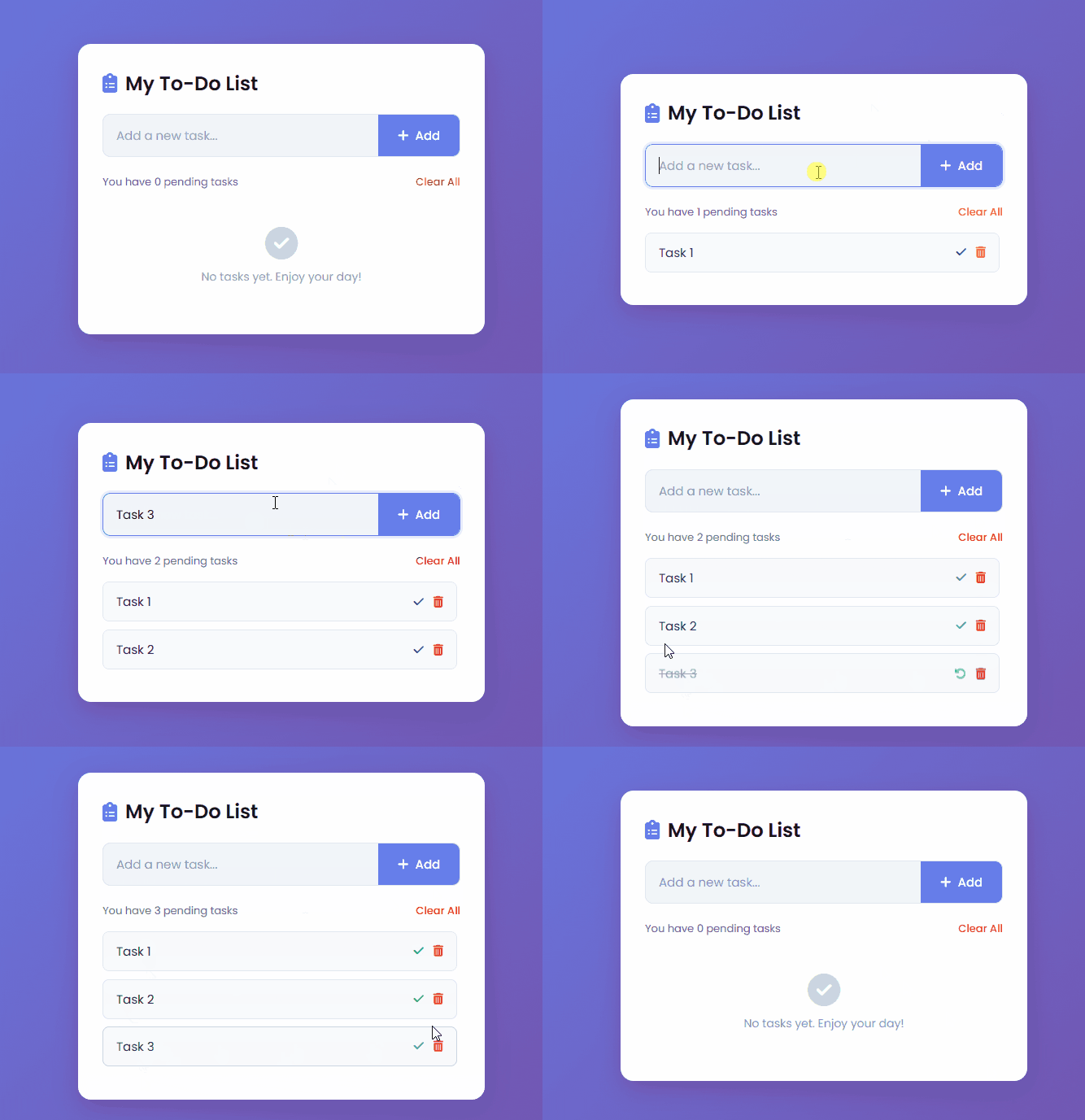
In this tutorial, we will walk through a modern, responsive To-Do App featuring smooth CSS gradients, dynamic task management, status toggles, real-time pending counters, and persistent data storage using the browser’s localStorage.
<!DOCTYPE html>
<html lang="en">
  <head>
    <meta charset="UTF-8" />
    <meta name="viewport" content="width=device-width, initial-scale=1.0" />
    <title>Modern To-Do App Tutorial</title>
    <!-- Font Awesome Icons for UI symbols -->
    <link
      rel="stylesheet"
      href="https://cdnjs.cloudflare.com/ajax/libs/font-awesome/6.4.0/css/all.min.css"
    />
    <!-- Google Fonts: Poppins -->
    <link
      href="https://fonts.googleapis.com/css2?family=Poppins:wght@300;400;500;600&display=swap"
      rel="stylesheet"
    />
    <!-- Custom Stylesheet -->
    <link rel="stylesheet" href="styles.css" />
  </head>
  <body>
    <div class="container">
      <div class="todo-app">
        <h2><i class="fa-solid fa-clipboard-list"></i> My To-Do List</h2>

        <!-- Input Form Section -->
        <div class="row">
          <input type="text" id="input-box" placeholder="Add a new task..." autocomplete="off" />
          <button id="add-btn"><i class="fa-solid fa-plus"></i> Add</button>
        </div>

        <!-- Task Statistics & Clear All Option -->
        <div class="task-info">
          <span id="task-counter">You have 0 pending tasks</span>
          <button class="clear-btn" id="clear-btn">Clear All</button>
        </div>

        <!-- Dynamic Task List Container -->
        <ul class="todo-list" id="todo-list">
          <!-- Tasks will be injected here dynamically via JavaScript -->
        </ul>

        <!-- Empty State UI (Shown when no tasks exist) -->
        <div class="empty-state" id="empty-state">
          <i class="fa-solid fa-check-circle"></i>
          <p>No tasks yet. Enjoy your day!</p>
        </div>
      </div>
    </div>

    <!-- Main JavaScript File -->
    <script src="app.js"></script>
  </body>
</html>/* Global Reset & Base Styling */
* {
margin: 0;
padding: 0;
box-sizing: border-box;
font-family: 'Poppins', sans-serif;
}
/* Body Layout with Soft Gradient Background */
body {
background: linear-gradient(135deg, #667eea, #764ba2);
min-height: 100vh;
display: flex;
justify-content: center;
align-items: center;
padding: 20px;
}
/* Main Container Wrapper */
.container {
width: 100%;
max-width: 500px;
}
/* App Card Styling */
.todo-app {
background: #ffffff;
padding: 30px;
border-radius: 16px;
box-shadow: 0 10px 30px rgba(0, 0, 0, 0.15);
}
/* App Title Heading */
.todo-app h2 {
color: #333;
font-size: 24px;
font-weight: 600;
margin-bottom: 20px;
display: flex;
align-items: center;
gap: 10px;
}
.todo-app h2 i {
color: #667eea;
}
/* Input Row Layout */
.row {
display: flex;
background: #f1f5f9;
border-radius: 10px;
overflow: hidden;
margin-bottom: 20px;
border: 1px solid #e2e8f0;
transition: all 0.3s ease;
}
/* Input Focus Glow Effect */
.row:focus-within {
border-color: #667eea;
box-shadow: 0 0 0 3px rgba(102, 126, 234, 0.15);
}
/* Text Input Field */
.row input {
flex: 1;
background: transparent;
border: none;
outline: none;
padding: 14px 16px;
font-size: 15px;
color: #333;
}
.row input::placeholder {
color: #94a3b8;
}
/* Add Button Styling */
.row button {
background: #667eea;
color: #fff;
border: none;
outline: none;
padding: 0 24px;
font-size: 15px;
font-weight: 500;
cursor: pointer;
transition: background 0.3s;
display: flex;
align-items: center;
gap: 8px;
}
.row button:hover {
background: #5a6fe2;
}
/* Task Info Bar (Counter & Clear Action) */
.task-info {
display: flex;
justify-content: space-between;
align-items: center;
margin-bottom: 15px;
font-size: 13px;
color: #64748b;
}
/* Clear All Action Button */
.clear-btn {
background: none;
border: none;
color: #ef4444;
font-size: 13px;
font-weight: 500;
cursor: pointer;
transition: color 0.2s;
}
.clear-btn:hover {
color: #dc2626;
text-decoration: underline;
}
/* Task List Container */
.todo-list {
list-style: none;
max-height: 300px;
overflow-y: auto;
padding-right: 4px;
}
/* Scrollbar Customization */
.todo-list::-webkit-scrollbar {
width: 6px;
}
.todo-list::-webkit-scrollbar-thumb {
background: #cbd5e1;
border-radius: 3px;
}
/* Individual Task Item Styling */
.todo-list li {
display: flex;
justify-content: space-between;
align-items: center;
background: #f8fafc;
padding: 12px 16px;
border-radius: 8px;
margin-bottom: 10px;
border: 1px solid #e2e8f0;
font-size: 15px;
color: #334155;
transition: all 0.2s ease;
}
.todo-list li:hover {
border-color: #cbd5e1;
transform: translateY(-1px);
}
/* Completed Task State Styling */
.todo-list li.completed .task-text {
text-decoration: line-through;
color: #94a3b8;
}
/* Task Text Label */
.task-text {
flex: 1;
cursor: pointer;
word-break: break-word;
margin-right: 10px;
}
/* Action Buttons Container (Complete & Delete) */
.task-actions {
display: flex;
gap: 12px;
}
.task-actions button {
background: none;
border: none;
cursor: pointer;
font-size: 14px;
transition: transform 0.2s;
}
.task-actions button.complete-btn {
color: #10b981;
}
.task-actions button.delete-btn {
color: #ef4444;
}
.task-actions button:hover {
transform: scale(1.15);
}
/* Empty State Placeholder */
.empty-state {
text-align: center;
padding: 30px 0;
color: #94a3b8;
display: none;
}
.empty-state i {
font-size: 40px;
margin-bottom: 10px;
color: #cbd5e1;
}
.empty-state p {
font-size: 14px;
}// ==========================================
// DOM ELEMENT SELECTIONS
// ==========================================
const inputBox = document.getElementById("input-box");
const addBtn = document.getElementById("add-btn");
const todoList = document.getElementById("todo-list");
const clearBtn = document.getElementById("clear-btn");
const taskCounter = document.getElementById("task-counter");
const emptyState = document.getElementById("empty-state");
// Load tasks from LocalStorage immediately when the DOM content is fully loaded
document.addEventListener("DOMContentLoaded", displayTasks);
// ==========================================
// EVENT LISTENERS
// ==========================================
addBtn.addEventListener("click", addTask);
// Trigger task addition when pressing the 'Enter' key inside the input box
inputBox.addEventListener("keypress", (e) => {
if (e.key === "Enter") addTask();
});
clearBtn.addEventListener("click", clearAllTasks);
// ==========================================
// LOCAL STORAGE UTILITIES
// ==========================================
/**
* Retrieves tasks array from browser's LocalStorage.
* Returns an empty array if no tasks are found.
*/
function getTasks() {
return localStorage.getItem("tasks") ? JSON.parse(localStorage.getItem("tasks")) : [];
}
/**
* Saves the updated tasks array back into LocalStorage.
* @param {Array} tasks - Array of task objects
*/
function saveTasks(tasks) {
localStorage.setItem("tasks", JSON.stringify(tasks));
}
// ==========================================
// CORE APP LOGIC
// ==========================================
/**
* Validates input and adds a new task object to LocalStorage, then refreshes the view.
*/
function addTask() {
const taskText = inputBox.value.trim();
// Validation check: prevent empty inputs
if (taskText === "") {
alert("Please enter a valid task!");
return;
}
const tasks = getTasks();
// Push new task object containing text and completion state
tasks.push({ text: taskText, completed: false });
saveTasks(tasks);
inputBox.value = ""; // Reset input field
displayTasks(); // Refresh rendered list
}
/**
* Renders the tasks list dynamically onto the DOM based on LocalStorage data.
*/
function displayTasks() {
const tasks = getTasks();
todoList.innerHTML = "";
// Handle empty state visibility and counter display
if (tasks.length === 0) {
emptyState.style.display = "block";
taskCounter.textContent = "You have 0 pending tasks";
return;
} else {
emptyState.style.display = "none";
}
let pendingCount = 0;
// Loop through tasks and build HTML structures dynamically
tasks.forEach((task, index) => {
if (!task.completed) pendingCount++;
const li = document.createElement("li");
if (task.completed) li.classList.add("completed");
li.innerHTML = `
<span class="task-text" onclick="toggleTask(${index})">${escapeHtml(task.text)}</span>
<div class="task-actions">
<button class="complete-btn" onclick="toggleTask(${index})" title="Complete / Undo">
<i class="fa-solid ${task.completed ? 'fa-rotate-left' : 'fa-check'}"></i>
</button>
<button class="delete-btn" onclick="deleteTask(${index})" title="Delete">
<i class="fa-solid fa-trash-can"></i>
</button>
</div>
`;
todoList.appendChild(li);
});
// Update pending tasks counter summary text
taskCounter.textContent = `You have ${pendingCount} pending tasks`;
}
/**
* Toggles the completion status of a specific task by its array index.
* @param {number} index - Task array index
*/
function toggleTask(index) {
const tasks = getTasks();
tasks[index].completed = !tasks[index].completed;
saveTasks(tasks);
displayTasks();
}
/**
* Deletes a single task item based on its index and updates storage.
* @param {number} index - Task array index
*/
function deleteTask(index) {
const tasks = getTasks();
tasks.splice(index, 1);
saveTasks(tasks);
displayTasks();
}
/**
* Clears all stored tasks after user confirmation.
*/
function clearAllTasks() {
if (getTasks().length === 0) return;
if (confirm("Are you sure you want to delete all tasks?")) {
localStorage.removeItem("tasks");
displayTasks();
}
}
// ==========================================
// SECURITY HELPERS
// ==========================================
/**
* Escapes special HTML characters to prevent XSS script injection vulnerabilities.
* @param {string} text - Raw input text
* @returns {string} - Sanitized text safe for HTML injection
*/
function escapeHtml(text) {
const map = {
'&': '&',
'<': '<',
'>': '>',
'"': '"',
"'": '''
};
return text.replace(/[&<>"']/g, function(m) { return map[m]; });
}How the Code Works
This application operates through a seamless loop of DOM manipulation, event handling, and browser storage synchronization:
- The Markup & Layout (
index.html): The structure uses clean semantic elements—a text input field for new tasks, an action button, a dynamic unordered list (<ul>), a counter display, and an “Empty State” placeholder that appears automatically when there are no tasks left. We also pull in Google Fonts (Poppins) and Font Awesome icons for a polished UI. - The Styling (
styles.css): Built with a modern CSS reset, flexible box layouts, and a vibrant background gradient (#667eeato#764ba2). It incorporates subtle transition effects, hover animations, scrollbar custom styling, and an explicit.completedclass that applies a clean strike-through and muted color to finished items. - The Logic & Persistence (
app.js):- Initialization: When the page loads (
DOMContentLoaded),displayTasks()runs to fetch any previously saved arrays from the browser’slocalStorage. - Adding Tasks: Entering a task (via click or pressing the
Enterkey) validates the input, packages it into an object ({ text: taskText, completed: false }), pushes it into the tasks array, and updates storage. - State & Rendering: The script loops through the data array, rendering HTML dynamically. It calculates active pending tasks for the live counter and toggles visibility for the empty state message.
- Security Protection: An
escapeHtml()helper function sanitizes user inputs to prevent any unwanted XSS script injection vulnerabilities.
- Initialization: When the page loads (
Customizable Variables & Elements
If you want to customize or tweak this code for your own design or tutorial layout, here are the key variables and parameters you can easily modify:
- Color Palette & Themes (
styles.css):- The main background gradient (
linear-gradient(135deg, #667eea, #764ba2)) can be swapped out to match your branding. - Primary action buttons use
#667eea, while deletion triggers use#ef4444(red) and completion states use#10b981(emerald green). You can adjust these hex codes to fit any color scheme.
- The main background gradient (
- Storage Key (
app.js):- The data is saved under the localStorage key
"tasks"(localStorage.getItem("tasks")). If you are running multiple mini-apps on the same local domain, you can rename this key (e.g.,"todo_app_tasks") to prevent data collisions.
- The data is saved under the localStorage key
- Container Width (
styles.css):- The max-width of the main card wrapper (
.container/.todo-app) is set to500pxfor a clean mobile-first look. You can expand or contract this value depending on your layout preferences.
- The max-width of the main card wrapper (