
Creating a reliable password generator is a classic project for web developers, but building one that is both visually modern and cryptographically secure elevates your portfolio.
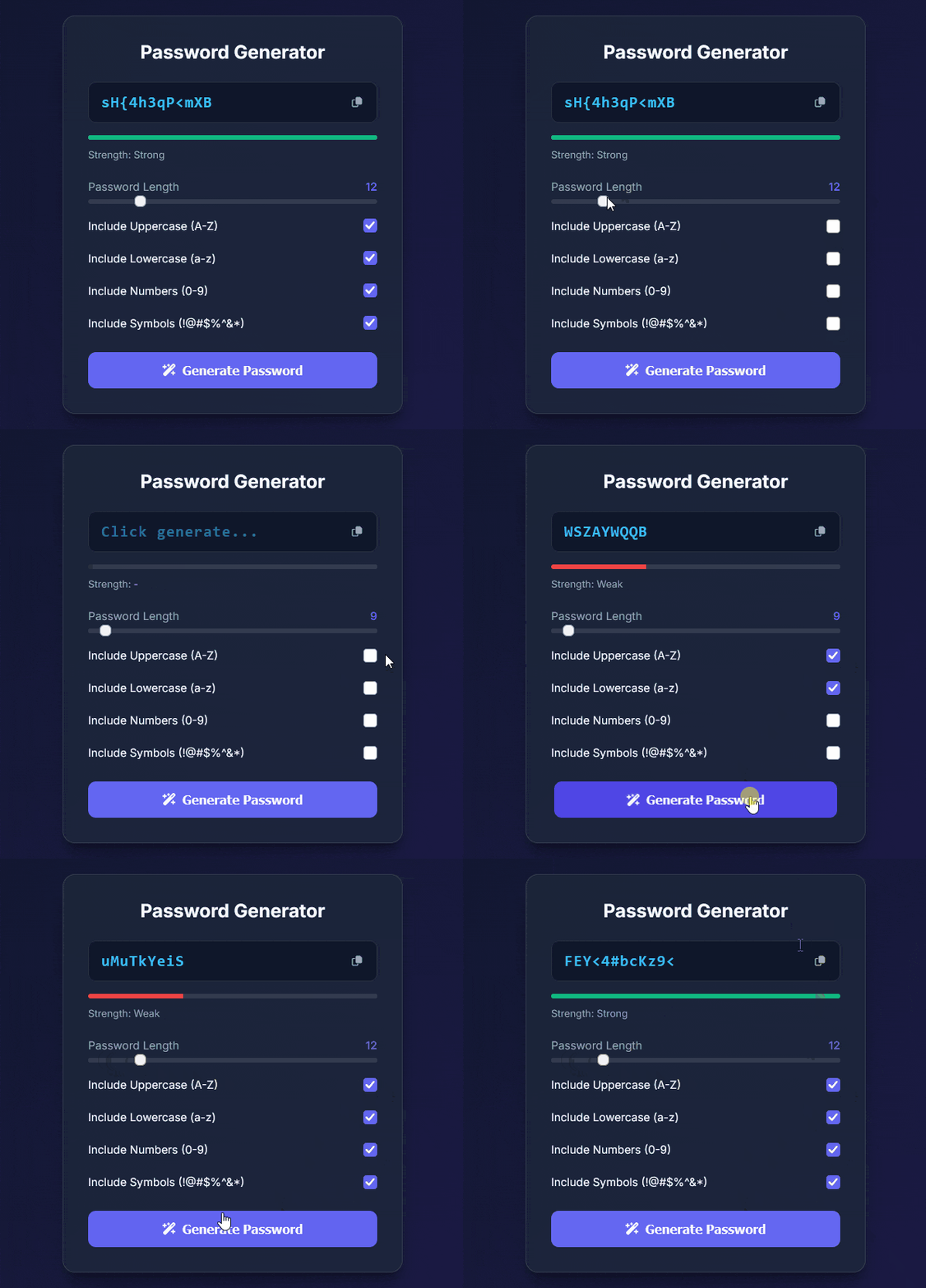
Below is a breakdown of how this custom Password Generator recipe works and how you can easily tweak its parameters.
<!DOCTYPE html>
<html lang="en">
  <head>
    <meta charset="UTF-8" />
    <meta name="viewport" content="width=device-width, initial-scale=1.0" />
    <title>Password Generator</title>
    <!-- Font Awesome Icons & Google Fonts (Inter) -->
    <link
      rel="stylesheet"
      href="https://cdnjs.cloudflare.com/ajax/libs/font-awesome/6.4.0/css/all.min.css"
    />
    <link
      href="https://fonts.googleapis.com/css2?family=Inter:wght@400;500;600;700&display=swap"
      rel="stylesheet"
    />
    <link rel="stylesheet" href="styles.css?v=2" />
  </head>
  <body>
    <!-- Main wrapper to center the app card -->
    <main class="wrapper">
      <div class="card">
        <h1>Password Generator</h1>

        <!-- Password Result Display Section -->
        <div class="p-header">
          <input
            type="text"
            id="password"
            placeholder="Click generate..."
            readonly
          />
          <button class="copy-btn" id="copy" title="Copy to Clipboard">
            <i class="fa-regular fa-copy"></i>
            <!-- Tooltip popup notification after copying -->
            <span id="copy-tooltip">Copied!</span>
          </button>
        </div>

        <!-- Password Strength Indicator Bar -->
        <div class="strength-container">
          <div class="strength-bar-wrapper">
            <div id="strength-bar" class="strength-bar"></div>
          </div>
          <span id="strength-text">Strength: -</span>
        </div>

        <!-- Password Options & Controls -->
        <div class="p-body">
          <!-- Password Length Range Slider -->
          <div class="form-field">
            <div class="label-wrapper">
              <label for="p-length">Password Length</label>
              <span id="length-value">12</span>
            </div>
            <input
              type="range"
              id="p-length"
              min="8"
              max="32"
              value="12"
              class="slider"
            />
          </div>

          <!-- Character Type Checkboxes -->
          <div class="form-field checkbox-field">
            <label for="p-uppercase">Include Uppercase (A-Z)</label>
            <input type="checkbox" checked id="p-uppercase" />
          </div>

          <div class="form-field checkbox-field">
            <label for="p-lowercase">Include Lowercase (a-z)</label>
            <input type="checkbox" checked id="p-lowercase" />
          </div>

          <div class="form-field checkbox-field">
            <label for="p-number">Include Numbers (0-9)</label>
            <input type="checkbox" checked id="p-number" />
          </div>

          <div class="form-field checkbox-field">
            <label for="p-symbol">Include Symbols (!@#$%^&*)</label>
            <input type="checkbox" checked id="p-symbol" />
          </div>

          <!-- Submit Button to Trigger Generation -->
          <button id="submit" class="submit-btn">
            <i class="fa-solid fa-wand-magic-sparkles"></i> Generate Password
          </button>
        </div>
      </div>
    </main>

    <script src="script.js"></script>
  </body>
</html>/* Custom CSS Variables for Theme Configuration */
:root {
--bg-gradient: linear-gradient(135deg, #0f172a 0%, #1e1b4b 100%);
--card-bg: rgba(30, 41, 59, 0.7);
--border-color: rgba(255, 255, 255, 0.1);
--primary: #6366f1;
--primary-hover: #4f46e5;
--text-main: #f8fafc;
--text-muted: #94a3b8;
--input-bg: #0f172a;
}
/* Reset default margins and padding */
* {
margin: 0;
padding: 0;
box-sizing: border-box;
}
/* Layout Centering & Background Setup */
body {
font-family: 'Inter', sans-serif;
background: var(--bg-gradient);
min-height: 100vh;
display: flex;
justify-content: center;
align-items: center;
color: var(--text-main);
padding: 1.5rem;
}
.wrapper {
width: 100%;
max-width: 440px;
}
/* Glassmorphism Card Style */
.card {
background: var(--card-bg);
backdrop-filter: blur(16px);
border: 1px solid var(--border-color);
padding: 2rem;
border-radius: 16px;
box-shadow: 0 20px 25px -5px rgba(0, 0, 0, 0.3), 0 8px 10px -6px rgba(0, 0, 0, 0.3);
}
h1 {
font-size: 1.5rem;
font-weight: 700;
text-align: center;
margin-bottom: 1.5rem;
color: var(--text-main);
}
/* Password Input Header Container */
.p-header {
position: relative;
display: flex;
align-items: center;
margin-bottom: 1rem;
}
.p-header input {
width: 100%;
background-color: var(--input-bg);
border: 1px solid var(--border-color);
padding: 0.875rem 3.5rem 0.875rem 1rem;
border-radius: 10px;
color: #38bdf8;
font-family: monospace;
font-size: 1.25rem;
font-weight: 600;
outline: none;
letter-spacing: 1px;
}
/* Copy Button Overlay Styling */
.copy-btn {
position: absolute;
right: 0.5rem;
background: transparent;
border: none;
color: var(--text-muted);
width: 2.25rem;
height: 2.25rem;
border-radius: 8px;
cursor: pointer;
display: flex;
align-items: center;
justify-content: center;
transition: all 0.2s;
}
.copy-btn:hover {
background: rgba(255, 255, 255, 0.1);
color: var(--text-main);
}
/* Floating "Copied!" Tooltip */
#copy-tooltip {
position: absolute;
top: -35px;
right: 0;
background: var(--primary);
color: #fff;
font-size: 0.75rem;
padding: 4px 8px;
border-radius: 4px;
opacity: 0;
visibility: hidden;
transition: opacity 0.2s;
}
#copy-tooltip.show {
opacity: 1;
visibility: visible;
}
/* Strength Bar Visual Indicator */
.strength-container {
margin-bottom: 1.5rem;
}
.strength-bar-wrapper {
height: 6px;
background: rgba(255, 255, 255, 0.1);
border-radius: 3px;
overflow: hidden;
margin-bottom: 0.5rem;
}
.strength-bar {
height: 100%;
width: 0%;
transition: width 0.3s, background-color 0.3s;
}
#strength-text {
font-size: 0.8rem;
color: var(--text-muted);
}
/* Form Layout Styles */
.p-body {
display: flex;
flex-direction: column;
gap: 1rem;
}
.form-field {
display: flex;
flex-direction: column;
gap: 0.5rem;
}
.label-wrapper {
display: flex;
justify-content: space-between;
font-size: 0.9rem;
color: var(--text-muted);
}
#length-value {
color: var(--primary);
font-weight: 600;
}
/* Custom Styled Range Slider */
.slider {
appearance: none;
-webkit-appearance: none;
width: 100%;
height: 6px;
border-radius: 3px;
background: rgba(255, 255, 255, 0.1);
outline: none;
}
.slider::-webkit-slider-thumb {
-webkit-appearance: none;
width: 18px;
height: 18px;
border-radius: 50%;
background: var(--primary);
cursor: pointer;
transition: transform 0.1s;
}
.slider::-webkit-slider-thumb:hover {
transform: scale(1.2);
}
/* Checkbox Row Layout */
.checkbox-field {
flex-direction: row;
justify-content: space-between;
align-items: center;
font-size: 0.9rem;
color: var(--text-main);
padding: 0.25rem 0;
}
.checkbox-field label {
cursor: pointer;
}
.checkbox-field input[type="checkbox"] {
width: 18px;
height: 18px;
accent-color: var(--primary);
cursor: pointer;
}
/* Action Button */
.submit-btn {
width: 100%;
padding: 0.875rem;
margin-top: 0.5rem;
font-size: 1rem;
font-weight: 600;
background-color: var(--primary);
color: var(--text-main);
border: none;
border-radius: 10px;
cursor: pointer;
display: flex;
align-items: center;
justify-content: center;
gap: 0.5rem;
transition: background-color 0.2s, transform 0.1s;
}
.submit-btn:hover {
background-color: var(--primary-hover);
}
.submit-btn:active {
transform: scale(0.98);
}/**
* Character sets used for password generation.
*/
const CHAR_SETS = {
uppercase: "ABCDEFGHIJKLMNOPQRSTUVWXYZ",
lowercase: "abcdefghijklmnopqrstuvwxyz",
numbers: "0123456789",
symbols: "!@#$%^&*()_+-=[]{}|;:,.<>?"
};
// Selecting DOM Elements
const pLength = document.getElementById("p-length");
const lengthValue = document.getElementById("length-value");
const upperCase = document.getElementById("p-uppercase");
const lowerCase = document.getElementById("p-lowercase");
const pNumber = document.getElementById("p-number");
const pSymbol = document.getElementById("p-symbol");
const submitBtn = document.getElementById("submit");
const passwordInput = document.getElementById("password");
const copyBtn = document.getElementById("copy");
const copyTooltip = document.getElementById("copy-tooltip");
const strengthBar = document.getElementById("strength-bar");
const strengthText = document.getElementById("strength-text");
/**
* Event Listener: Updates the slider numerical display in real-time as the user drags it.
*/
pLength.addEventListener("input", (e) => {
lengthValue.textContent = e.target.value;
});
/**
* Generates a cryptographically secure random character from a given character set.
* Uses window.crypto.getRandomValues() instead of Math.random() for better security.
*
* @param {string} charSet - The string of characters to choose from.
* @returns {string} - A single randomly chosen character.
*/
function getRandomChar(charSet) {
const randomArray = new Uint32Array(1);
window.crypto.getRandomValues(randomArray);
return charSet[randomArray[0] % charSet.length];
}
/**
* Main Function: Generates the random password based on selected criteria.
*
* How it works:
* 1. Checks which character options are selected.
* 2. Guarantees that at least one character from each selected set is included.
* 3. Fills the remaining password length with random choices from all selected sets.
* 4. Shuffles the final character array randomly to prevent predictable patterns.
*
* @returns {string} The finalized password string.
*/
function generatePassword() {
let availableChars = "";
let requiredChars = [];
// Check user options and add required characters
if (upperCase.checked) {
availableChars += CHAR_SETS.uppercase;
requiredChars.push(getRandomChar(CHAR_SETS.uppercase));
}
if (lowerCase.checked) {
availableChars += CHAR_SETS.lowercase;
requiredChars.push(getRandomChar(CHAR_SETS.lowercase));
}
if (pNumber.checked) {
availableChars += CHAR_SETS.numbers;
requiredChars.push(getRandomChar(CHAR_SETS.numbers));
}
if (pSymbol.checked) {
availableChars += CHAR_SETS.symbols;
requiredChars.push(getRandomChar(CHAR_SETS.symbols));
}
// Validation: Alert user if no checkboxes are selected
if (availableChars === "") {
alert("Please select at least one character option!");
return "";
}
const length = parseInt(pLength.value, 10);
let password = [...requiredChars];
// Fill remaining slots up to the selected password length
for (let i = requiredChars.length; i < length; i++) {
password.push(getRandomChar(availableChars));
}
// Shuffle the character array to randomize order
password = password.sort(() => Math.random() - 0.5).join("");
return password;
}
/**
* Evaluates the strength of the generated password and updates the visual UI indicator.
*
* Scoring criteria:
* - Length (>= 10 and >= 14 chars)
* - Inclusion of uppercase, lowercase, numbers, and symbols.
*
* @param {string} password - The generated password string.
*/
function updateStrengthMeter(password) {
if (!password) {
strengthBar.style.width = "0%";
strengthText.textContent = "Strength: -";
return;
}
let score = 0;
if (password.length >= 10) score += 1;
if (password.length >= 14) score += 1;
if (/[A-Z]/.test(password)) score += 1;
if (/[a-z]/.test(password)) score += 1;
if (/[0-9]/.test(password)) score += 1;
if (/[^A-Za-z0-9]/.test(password)) score += 1;
// Render Strength Bar Color and Status Text based on Score
if (score <= 2) {
strengthBar.style.width = "33%";
strengthBar.style.backgroundColor = "#ef4444"; // Red (Weak)
strengthText.textContent = "Strength: Weak";
} else if (score <= 4) {
strengthBar.style.width = "66%";
strengthBar.style.backgroundColor = "#f59e0b"; // Yellow (Medium)
strengthText.textContent = "Strength: Medium";
} else {
strengthBar.style.width = "100%";
strengthBar.style.backgroundColor = "#10b981"; // Green (Strong)
strengthText.textContent = "Strength: Strong";
}
}
/**
* Event Listener: Click handler for the Generate button.
*/
submitBtn.addEventListener("click", () => {
const newPassword = generatePassword();
passwordInput.value = newPassword;
updateStrengthMeter(newPassword);
});
/**
* Event Listener: Copies password to clipboard using modern Clipboard API.
* Displays a temporary tooltip feedback message.
*/
copyBtn.addEventListener("click", async () => {
if (!passwordInput.value) return;
try {
await navigator.clipboard.writeText(passwordInput.value);
copyTooltip.classList.add("show");
setTimeout(() => {
copyTooltip.classList.remove("show");
}, 1500);
} catch (err) {
console.error("Failed to copy text: ", err);
}
});
/**
* Event Listener: Automatically generates an initial password when the page loads.
*/
window.addEventListener("DOMContentLoaded", () => {
submitBtn.click();
});Code Blueprint: How It Works
This project is built using standard HTML5, CSS3 (Glassmorphism design), and modern JavaScript. Here is the step-by-step logic behind the application:
- Cryptographically Secure Randomization: Instead of using the predictable
Math.random(), the app useswindow.crypto.getRandomValues()to pick characters. This ensures the generated strings meet real-world cryptographic safety standards. - Guaranteed Character Inclusions: When options (like numbers or symbols) are checked, the algorithm guarantees at least one character from each selected set is pushed into the password array before filling the rest of the requested length.
- Array Shuffling: Once all characters are assembled, the array is randomly shuffled using a sorting function. This prevents predictable pattern placement (e.g., preventing uppercase characters from always appearing first).
- Real-time Password Strength Evaluation: A dynamic strength meter analyzes the final string length and character diversity, immediately updating the UI bar with visual feedback (Weak, Medium, Strong).
- Modern Clipboard Integration: The copy action uses the native Asynchronous Clipboard API (
navigator.clipboard.writeText) paired with a smooth micro-interaction tooltip instead of intrusive browser alerts.
Customization Guide: Key Variables You Can Tweak
You can easily adapt this codebase to fit your own design system or security requirements by modifying these key variables:
1. Character Sets Object (CHAR_SETS)
- Location:
script.js - Purpose: Defines all available characters for each category.
- Customization: You can remove tricky characters (like
Oand0orland1) to avoid visual confusion, or add extra special characters.
2. Slider Boundaries (min & max attributes)
- Location:
index.htmlinside the<input type="range">element - Purpose: Controls the minimum and maximum allowed password lengths.
- Customization: Adjust
min="8"andmax="32"to set custom limits (e.g.,min="12"andmax="64"for stricter security defaults).
3. Visual Theme Color Tokens (:root)
- Location:
styles.css - Purpose: Stores CSS variables for primary colors, backgrounds, and text shades.
- Customization: Modify
--primaryor--bg-gradientto instantly retheme the interface to match your brand colors.
4. Tooltip Display Duration
- Location:
script.jsinside thecopyBtnevent listener - Purpose: Determines how long the “Copied!” notification remains visible.
- Customization: Change the timeout parameter (
1500milliseconds) to adjust how quickly the tooltip fades away.