
Welcome to today’s code recipe! If you’re looking for a clean, practical project to sharpen your front-end development skills, you’ve come to the right place. Today, we’re cooking up an interactive Body Mass Index (BMI) Calculator using basic HTML, CSS, and JavaScript.
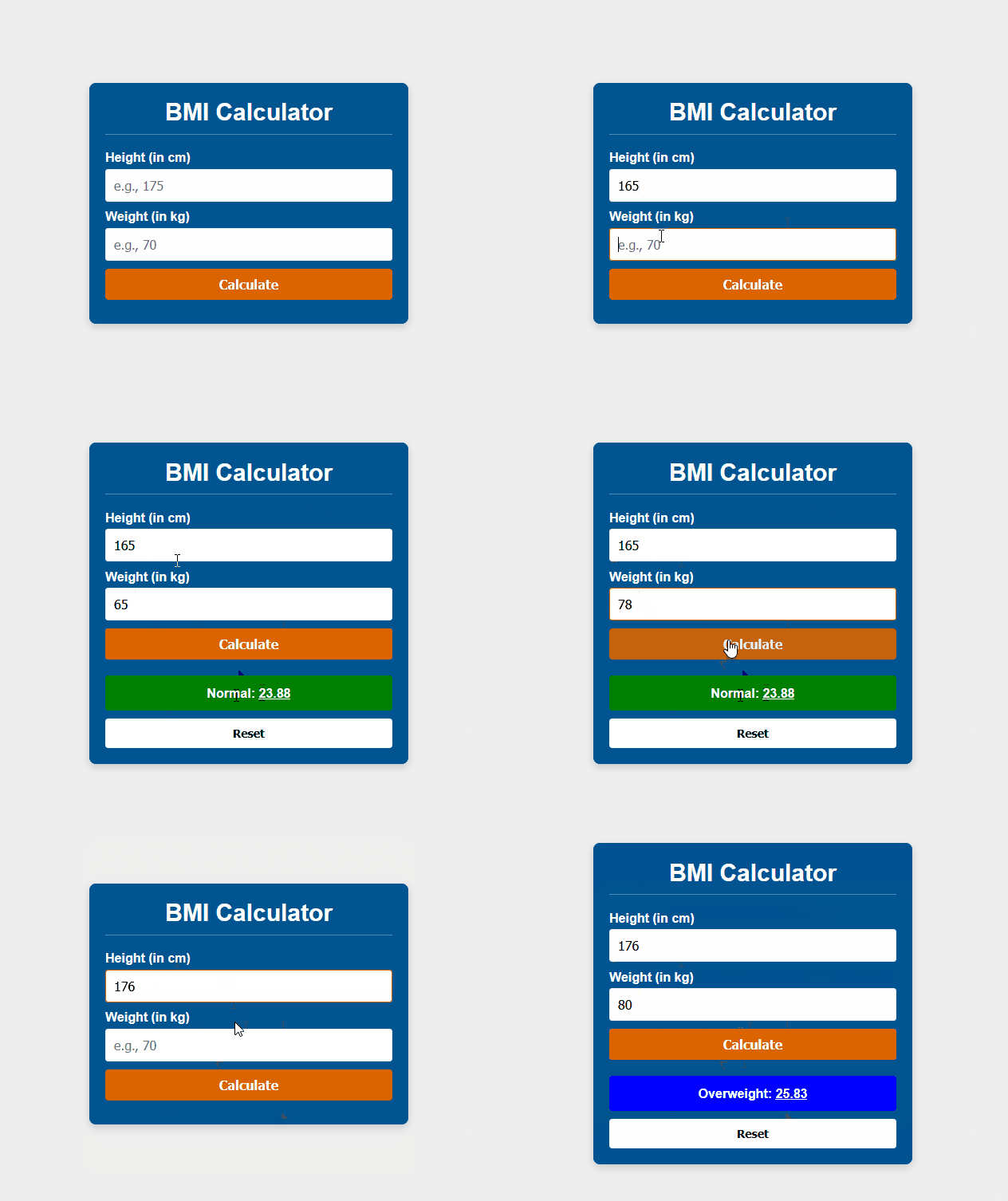
This project is lightweight, fully functional, and easy to customize for your own web projects. Let’s dive into how it works!
<!DOCTYPE html>
<html lang="en">
  <head>
    <!-- Character Encoding & Viewport for Responsive Design -->
    <meta charset="UTF-8" />
    <meta name="viewport" content="width=device-width, initial-scale=1.0" />
    <title>BMI Calculator</title>

    <!-- Font Awesome Icon Kit Integration -->
    <script
      src="https://kit.fontawesome.com/1935d064dd.js"
      crossorigin="anonymous"
    ></script>

    <!-- External CSS Stylesheet Linkage -->
    <link rel="stylesheet" href="styles.css" />
  </head>
  <body>
    <!-- Main Outer Wrapper / Flexbox Centering Container -->
    <section>
      <!-- Central Card Box Component -->
      <div class="container box">
        <!-- Main Application Title -->
        <h1>BMI Calculator</h1>
        <hr />

        <!-- User Input Form Container -->
        <form action="">
          <!-- Height Input Group -->
          <div>
            <label for="height">Height (in cm)</label>
            <input type="text" id="height" class="height" placeholder="e.g., 175" />
          </div>

          <!-- Weight Input Group -->
          <div>
            <label for="weight">Weight (in kg)</label>
            <input type="text" id="weight" class="weight" placeholder="e.g., 70" />
          </div>

          <!-- Form Submit / Calculation Trigger Button -->
          <button class="btn">Calculate</button>
        </form>

        <!-- Dynamic Output Result Card (Background & Content Updated via JS) -->
        <p class="result"></p>

        <!-- Form Reset Button (Initially Hidden, Toggled via JS) -->
        <button class="reset">Reset</button>
      </div>
    </section>

    <!-- External JavaScript Application Logic -->
    <script src="script.js"></script>
  </body>
</html>/* ==========================================================================
BMI CALCULATOR - STYLESHEET WITH FULL INLINE DOCUMENTATION
========================================================================== */
/* --------------------------------------------------------------------------
CSS CUSTOM PROPERTIES (DESIGN TOKENS)
Centralized variables for easy theme customization and maintenance.
-------------------------------------------------------------------------- */
/* Brand & Layout Palette */
:root {
--white: #ffffff;
--black: #1c2b2d;
--blue: #31326f;
--light-blue: #005490;
--color-primary: #9d0191;
--color-sec: #db6400;
--grey: #eee;s
--dark-grey: #222831;
/* BMI Status Category Colors (Used dynamically via JS / UI feedback) */
--color-underweight: orange;
--color-normal: green;
--color-overweight: blue;
--color-obese: red;
/* Typography & Layout Spacing */
--font-main: "Open Sans", sans-serif;
--card-max-width: 40rem;
}
/* --------------------------------------------------------------------------
2. GLOBAL CSS RESETS & BASE STYLES
Ensures consistent rendering across different web browsers.
-------------------------------------------------------------------------- */
* {
margin: 0;
padding: 0;
box-sizing: border-box; /* Includes padding and borders in element total width/height */
}
html {
/* Set base font-size to 10px so 1rem = 10px for easier responsive calculations */
font-size: 10px;
}
body {
font-family: var(--font-main);
background-color: var(--grey);
color: var(--black);
}
p {
font-size: 1.6rem; /* Equivalent to 16px */
line-height: 1.5; /* Improves text readability */
}
img {
width: 100%;
display: block;
}
/* --------------------------------------------------------------------------
3. CONTAINER & CENTERING LAYOUT LOGIC
Uses Flexbox to center the calculator widget vertically and horizontally.
-------------------------------------------------------------------------- */
.container {
max-width: 900px;
margin: 0 auto;
padding: 0 20px;
}
section {
/* Full viewport height layout container */
height: 100vh;
display: flex;
justify-content: center; /* Horizontally centers the card */
align-items: center; /* Vertically centers the card */
}
.box {
width: var(--card-max-width);
background-color: var(--light-blue);
padding: 2rem;
color: var(--white);
border-radius: 8px; /* Smooth corners for visual appeal */
box-shadow: 0 4px 10px rgba(0, 0, 0, 0.15); /* Depth shadow effect */
}
h1 {
font-size: 3rem;
text-align: center;
margin-bottom: 1rem;
}
hr {
border: none;
height: 1px;
background-color: rgba(255, 255, 255, 0.3);
margin-bottom: 1rem;
}
/* --------------------------------------------------------------------------
4. FORM CONTROLS & INPUT STYLING
-------------------------------------------------------------------------- */
form {
padding: 1rem 0;
font-size: 1.6rem;
}
form > div {
padding-bottom: 1rem;
display: flex;
flex-direction: column;
}
form label {
margin-bottom: 0.5rem;
font-weight: 600;
}
form input {
padding: 1rem;
width: 100%;
font-size: 1.6rem;
border: 1px solid var(--grey);
border-radius: 4px;
outline: none;
}
form input:focus {
border-color: var(--color-sec); /* Highlights field when focused */
}
/* --------------------------------------------------------------------------
5. BUTTON STYLES & INTERACTION STATES
-------------------------------------------------------------------------- */
.btn {
padding: 1rem;
width: 100%;
font-size: 1.6rem;
background-color: var(--color-sec);
color: var(--white);
cursor: pointer;
outline: none;
border: none;
border-radius: 4px;
font-weight: 700;
transition: opacity 0.2s ease-in-out;
}
.btn:hover {
opacity: 0.9; /* Slight feedback on button hover */
}
/* --------------------------------------------------------------------------
6. DYNAMIC RESULT CARD & RESET BUTTON STYLES
Controlled dynamically by JavaScript during user interactions.
-------------------------------------------------------------------------- */
.result {
padding: 1rem;
margin-top: 1rem;
text-align: center;
font-weight: 600;
border-radius: 4px;
color: var(--white);
/* Background color is applied dynamically by JavaScript based on BMI score */
}
.result span {
font-weight: 700;
text-decoration: underline;
}
.reset {
width: 100%;
padding: 1rem;
margin-top: 1rem;
font-size: 1.4rem;
background-color: var(--white);
color: var(--black);
border: none;
border-radius: 4px;
cursor: pointer;
display: none; /* Hidden by default; JavaScript reveals it after submission */
font-weight: 600;
}
.reset:hover {
background-color: var(--grey);
}/**
* ==========================================================================
* BMI CALCULATOR - JAVASCRIPT LOGIC WITH FULL INLINE DOCUMENTATION
* ==========================================================================
*
* BMI Standard Thresholds (WHO Metrics):
* - Underweight : < 18.5
* - Normal : 18.5 - 24.9
* - Overweight : 25.0 - 29.9
* - Obese : 30.0 and above
*/
// --------------------------------------------------------------------------
// 1. DOM ELEMENT SELECTION
// Grab references to the interactive HTML elements.
// --------------------------------------------------------------------------
const btn = document.querySelector(".btn"),
result = document.querySelector(".result"),
reset = document.querySelector(".reset");
// --------------------------------------------------------------------------
// 2. EVENT LISTENERS
// Listen for click events to trigger calculation logic.
// --------------------------------------------------------------------------
btn.addEventListener("click", calculateBMI);
/**
* Main function that processes user inputs, validates them,
* calculates the BMI score, and triggers UI updates.
*
* @param {Event} e - The event object automatically passed by the listener.
*/
function calculateBMI(e) {
// Prevent default form submission behavior (page refresh)
e.preventDefault();
// Extract raw string values from the input fields at the time of submission
let height = document.querySelector(".height").value;
let weight = document.querySelector(".weight").value;
console.log("Input Height (cm):", height);
// ------------------------------------------------------------------------
// 3. INPUT VALIDATION LOGIC
// Ensures inputs are not empty and contain valid numeric data.
// ------------------------------------------------------------------------
if (height === "" || isNaN(height)) {
return (result.innerHTML = "Provide a valid Height!");
} else if (weight === "" || isNaN(weight)) {
return (result.innerHTML = "Provide a valid Weight!"); // Corrected feedback message
} else {
// ----------------------------------------------------------------------
// 4. MATHEMATICAL CALCULATION
// Convert height from centimeters to meters, then calculate BMI.
// Formula: BMI = Weight (kg) / [Height (m)]^2
// ----------------------------------------------------------------------
height = height / 100; // Convert cm to meters
let bmi = (weight / Math.pow(height, 2)).toFixed(2); // Round to 2 decimal places
console.log("Calculated BMI:", bmi);
// ----------------------------------------------------------------------
// 5. BMI CATEGORIZATION & DYNAMIC UI FEEDBACK
// Categorize score based on WHO standard limits and apply dynamic colors.
// ----------------------------------------------------------------------
if (bmi < 18.5) {
showResult(`Underweight: <span>${bmi}</span>`, "orange");
} else if (bmi >= 18.5 && bmi < 24.9) {
showResult(`Normal: <span>${bmi}</span>`, "green");
} else if (bmi >= 25.0 && bmi < 29.9) {
showResult(`Overweight: <span>${bmi}</span>`, "blue");
} else {
showResult(`Obese: <span>${bmi}</span>`, "red");
}
}
// Reveal the reset button after calculation completes
reset.style.display = "block";
}
/**
* Helper function to display the calculated result and change the background color.
*
* @param {string} val - HTML content containing category name and BMI value.
* @param {string} color - Background color corresponding to the BMI category.
* @returns {string} - The updated innerHTML content.
*/
function showResult(val, color) {
result.style.backgroundColor = color;
result.style.display = "block"; // Ensure result element is visible
return (result.innerHTML = val);
}
// --------------------------------------------------------------------------
// 6. RESET FORM LOGIC
// Resets form inputs and restores initial visual state.
// --------------------------------------------------------------------------
reset.addEventListener("click", () => {
document.querySelector("form").reset(); // Clears text input fields
reset.style.display = "none"; // Hides reset button
result.style.display = "none"; // Hides result badge
});🍳 How the Code Works
The application is split into three main components:
- HTML (Structure):
- Creates a modern card layout (
.box) containing an input form for Height (in centimeters) and Weight (in kilograms). - Includes action buttons for computing the result (
Calculate) and restoring the form (Reset). - Uses FontAwesome for icons and connects external stylesheets and scripts.
- Creates a modern card layout (
- CSS (Styling):
- Uses flexbox to center the calculator card in the middle of the viewport.
- Defines CSS custom properties (
:rootvariables) for consistent, re-usable color palettes. - Sets rem-based sizing and smooth layout formatting.
- JavaScript (Logic):
- Event Handling: Listens for the “Calculate” button click, preventing default page submission with
e.preventDefault(). - Validation: Ensures both height and weight inputs are not empty and contain numeric values.
- Calculation: Converts height from centimeters to meters ($height / 100$) and calculates BMI using the formula $\text{weight} / \text{height}^2$. The result is rounded to two decimal places with
.toFixed(2). - Categorization & UI Updates: Evaluates the calculated BMI score against standard WHO threshold categories (Underweight, Normal, Overweight, Obese) and changes the background color dynamically depending on the status.
- Reset: A dedicated reset handler clears the inputs and hides the status card and reset button.
- Event Handling: Listens for the “Calculate” button click, preventing default page submission with
🔑 Key Variables & Customization Notes
If you want to tweak or improve this application, here are the key variables and logic segments to pay attention to:
1. JavaScript Variables & Selectors
- Threshold Values (
calculateBMIfunction):18.5: The upper limit for Underweight.24.9: The upper limit for Normal weight.29.9: The upper limit for Overweight.- Note: You can update these logic conditions if you wish to implement regional BMI scales (such as Asian BMI standards).
- Input Validation Typo Notice:
- In the validation block, check line 20:JavaScript
} else if (weight === "" || isNaN(weight)) { return (result.innerHTML = "Provide a valid Height!"); }Tip: You may want to update the error message string to say"Provide a valid Weight!"instead.
- In the validation block, check line 20:JavaScript
2. CSS Custom Properties (styles.css)
You can easily restyle the theme of the calculator by modifying the color variables inside :root:
--light-blue: Card background color.--color-sec: Accent/button color.--grey/--white: General application theme tones.
Happy coding! Feel free to copy, modify, and integrate this script into your web app portfolio.