Need a sleek, interactive widget for your web app or just looking to practice your front-end web development skills? In this recipe, we’ll build a Random Hex Color Generator featuring a glassmorphism UI card, smooth background transitions, and a built-in copy-to-clipboard functionality using HTML, CSS, and JavaScript.
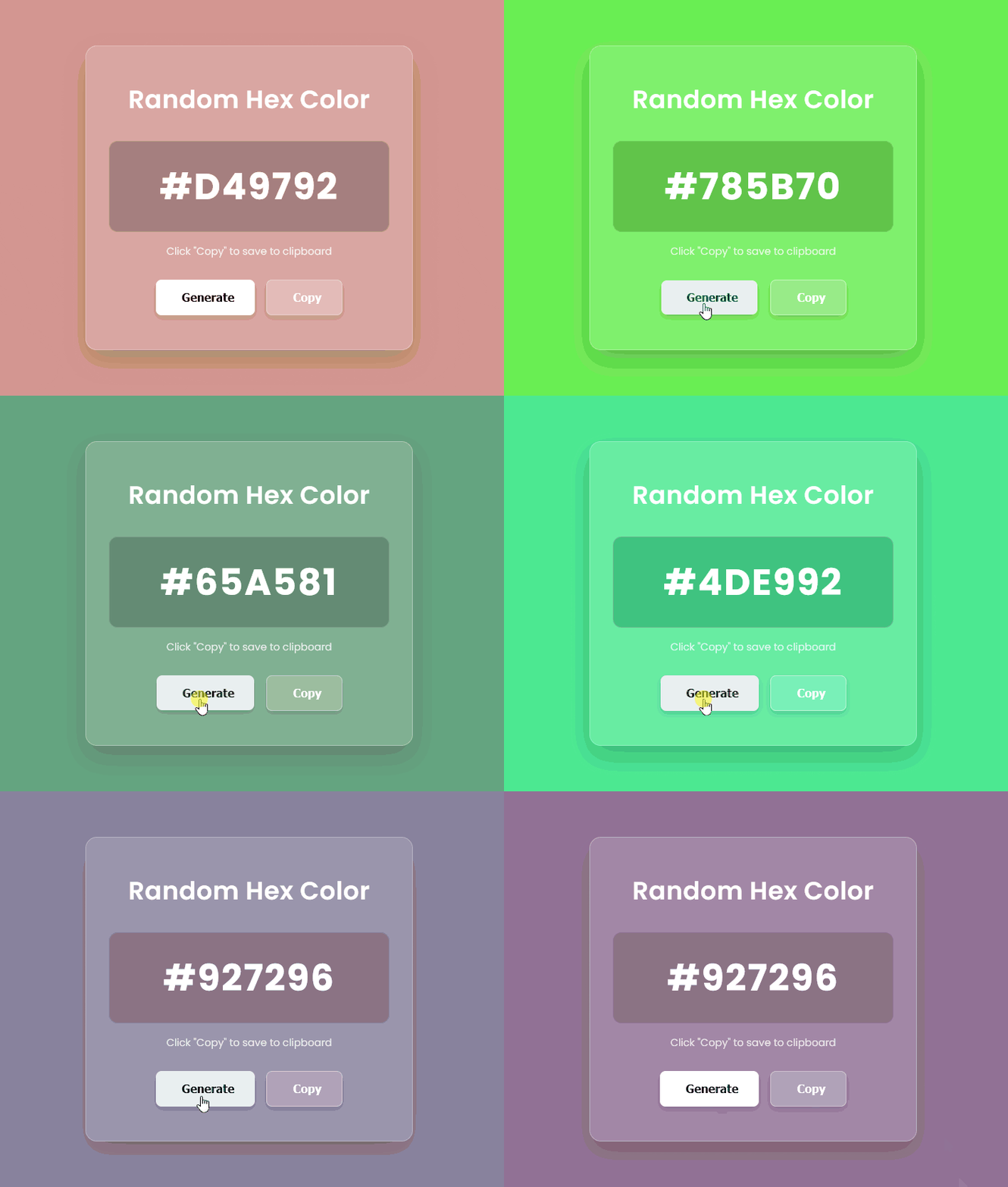
<!DOCTYPE html>
<html lang="en">
  <head>
    <meta charset="UTF-8" />
    <meta name="viewport" content="width=device-width, initial-scale=1.0" />
    <title>Random Hex Color Generator</title>

    <!-- FontAwesome for UI Icons -->
    <script
      src="https://kit.fontawesome.com/1935d064dd.js"
      crossorigin="anonymous"
    ></script>

    <!-- Google Fonts: Poppins -->
    <link
      href="https://fonts.googleapis.com/css2?family=Poppins:wght@300;400;500;600;700&display=swap"
      rel="stylesheet"
    />

    <!-- Custom Stylesheet -->
    <link rel="stylesheet" href="styles.css" />
  </head>
  <body>
    <!-- Main Application Container -->
    <div class="container">
      <div class="color-card">
        <h1>Random Hex Color</h1>

        <!-- Display Box for Generated Hex Code -->
        <div class="color-display">
          <span class="hex-code">#FFFFFF</span>
        </div>

        <!-- Status / Feedback Message -->
        <p class="copy-feedback">Click "Copy" to save to clipboard</p>

        <!-- Interactive Control Buttons -->
        <div class="buttons">
          <button class="btn generate">
            <i class="fas fa-sync-alt"></i> Generate
          </button>
          <button class="btn copy">
            <i class="fas fa-copy"></i> Copy
          </button>
        </div>
      </div>
    </div>

    <!-- Application Logic Script -->
    <script src="script.js"></script>
  </body>
</html>/* Import Google Fonts */
@import url("https://fonts.googleapis.com/css2?family=Poppins:wght@300;400;500;600;700&display=swap");
/* Global CSS Reset */
* {
margin: 0;
padding: 0;
box-sizing: border-box;
}
/* Base Body Styles and Layout Alignment */
body {
font-family: "Poppins", sans-serif;
height: 100vh;
display: flex;
justify-content: center;
align-items: center;
/* Smooth color transition when a new background color is generated */
transition: background-color 0.5s ease;
background-color: #31326f;
}
/* Centered Container Wrapper */
.container {
width: 100%;
max-width: 500px;
padding: 0 20px;
}
/* Glassmorphism Card Container */
.color-card {
background: rgba(255, 255, 255, 0.15);
backdrop-filter: blur(12px);
-webkit-backdrop-filter: blur(12px);
border: 1px solid rgba(255, 255, 255, 0.3);
padding: 3rem 2rem;
border-radius: 16px;
text-align: center;
box-shadow: 0 15px 35px rgba(0, 0, 0, 0.2);
color: #ffffff;
}
/* Header Title Styling */
.color-card h1 {
font-size: 2.2rem;
font-weight: 600;
margin-bottom: 2rem;
letter-spacing: 0.5px;
}
/* Hex Display Inner Box */
.color-display {
background: rgba(0, 0, 0, 0.2);
padding: 1.5rem;
border-radius: 12px;
margin-bottom: 1rem;
border: 1px solid rgba(255, 255, 255, 0.1);
}
/* Large Hex Code Text */
.hex-code {
font-size: 3.2rem;
font-weight: 700;
letter-spacing: 2px;
}
/* Feedback/Instruction Label */
.copy-feedback {
font-size: 0.9rem;
margin-bottom: 2rem;
opacity: 0.8;
height: 1.2rem;
}
/* Button Group Wrapper */
.buttons {
display: flex;
gap: 1rem;
justify-content: center;
}
/* Base Button Styling */
.btn {
padding: 0.9rem 1.8rem;
font-size: 1rem;
font-weight: 600;
border: none;
border-radius: 8px;
cursor: pointer;
display: flex;
align-items: center;
gap: 8px;
transition: transform 0.2s ease, background-color 0.2s ease, box-shadow 0.2s ease;
box-shadow: 0 4px 10px rgba(0, 0, 0, 0.15);
}
/* Active Click Feedback Effect */
.btn:active {
transform: scale(0.96);
}
/* Generate Button Theme */
.btn.generate {
background-color: #ffffff;
color: #1c2b2d;
}
.btn.generate:hover {
background-color: #f0f0f0;
}
/* Copy Button Theme */
.btn.copy {
background-color: rgba(255, 255, 255, 0.2);
color: #ffffff;
border: 1px solid rgba(255, 255, 255, 0.4);
}
.btn.copy:hover {
background-color: rgba(255, 255, 255, 0.35);
}// Selecting DOM elements
const hexCode = document.querySelector(".hex-code");
const generateBtn = document.querySelector(".generate");
const copyBtn = document.querySelector(".copy");
const copyFeedback = document.querySelector(".copy-feedback");
/**
* Generates a random 6-character hexadecimal color code,
* applies it as the page background color, and updates the UI display text.
*/
const generateColor = () => {
// Generate a random integer between 0 and 16777215 (FFFFFF in decimal)
// Convert it to hexadecimal string and pad with leading zeros if necessary
const randomColor = Math.floor(Math.random() * 16777215)
.toString(16)
.padStart(6, "0");
const fullHex = "#" + randomColor.toUpperCase();
// Apply background color to the body and update the UI label
document.body.style.backgroundColor = fullHex;
hexCode.textContent = fullHex;
// Reset feedback text prompt
copyFeedback.textContent = 'Click "Copy" to save to clipboard';
};
/**
* Copies the current hexadecimal color code to the user's clipboard
* using the modern Clipboard API and provides visual confirmation feedback.
*/
const copyToClipboard = () => {
const textToCopy = hexCode.textContent;
// Write the text to clipboard
navigator.clipboard.writeText(textToCopy).then(() => {
copyFeedback.textContent = `Copied to clipboard: ${textToCopy}!`;
// Reset feedback message back after 2 seconds
setTimeout(() => {
copyFeedback.textContent = 'Click "Copy" to save to clipboard';
}, 2000);
});
};
// Register click event listeners for interactive buttons
generateBtn.addEventListener("click", generateColor);
copyBtn.addEventListener("click", copyToClipboard);
// Automatically generate an initial random color when the page loads
generateColor();💡 How the Code Works
This snippet combines lightweight HTML, modern CSS styling, and functional JavaScript to deliver an interactive color generator:
- 24-Bit Color Mathematics: In digital graphics, colors are represented in 24-bit RGB space, spanning from
0(#000000) to16,777,215(#FFFFFF). The code generates a random integer within this range usingMath.floor(Math.random() * 16777215). - Base-16 String Conversion: Calling
.toString(16)converts the random decimal integer into a hexadecimal string. To guarantee that short hex values always maintain a valid 6-character length,.padStart(6, '0')automatically pads missing leading digits with zeros. - Smooth Glassmorphism UI: The CSS utilizes
backdrop-filter: blur(12px)combined with semi-transparent background colors (rgba) to create a polished, frosted-glass effect over the dynamic background color. - Modern Clipboard API: When the Copy button is pressed,
navigator.clipboard.writeText()saves the active Hex code directly to the user’s system clipboard without reloading the page or needing legacy fallback scripts.
⚙️ Customization Guide: Variables & Parameters You Can Change
Want to adapt this code for your own website or theme? Here are the key variables and properties you can tweak:
1. CSS Styling & Layout (styles.css)
Background Blur Intensity:
backdrop-filter: blur(12px);Change 12px to a higher value (e.g., 20px) for a heavier frosted-glass look, or lower (e.g., 5px) for a clearer transparency.
Transition Speed:
transition: background-color 0.5s ease; Adjust 0.5s to speed up or slow down the smooth fade transition when new colors are generated.
Card Width & Radius:
.container { max-width: 500px; }
.color-card { border-radius: 16px; }Modify max-width or border-radius to adjust the widget size and corner roundness.
2. JavaScript Configuration (script.js)
Feedback Timeout Duration:
setTimeout(() => {
  copyFeedback.textContent = 'Click "Copy" to save to clipboard';
}, 2000); The value 2000 (2 seconds) controls how long the “Copied to clipboard!” message stays visible before resetting. Change this to 3000 for 3 seconds, or 1500 for a quicker reset.
Letter Case Output:
const fullHex = "#" + randomColor.toUpperCase(); If you prefer lowercase Hex codes (e.g., #ffffff instead of #FFFFFF), simply change .toUpperCase() to .toLowerCase().