
Welcome to another edition of our code cookbook series! Today, we are serving up a neat, ready-to-use recipe for building a powerful web tool that instantly transforms standard Google Drive share links into direct download URLs and ready-to-use HTML embed snippets.
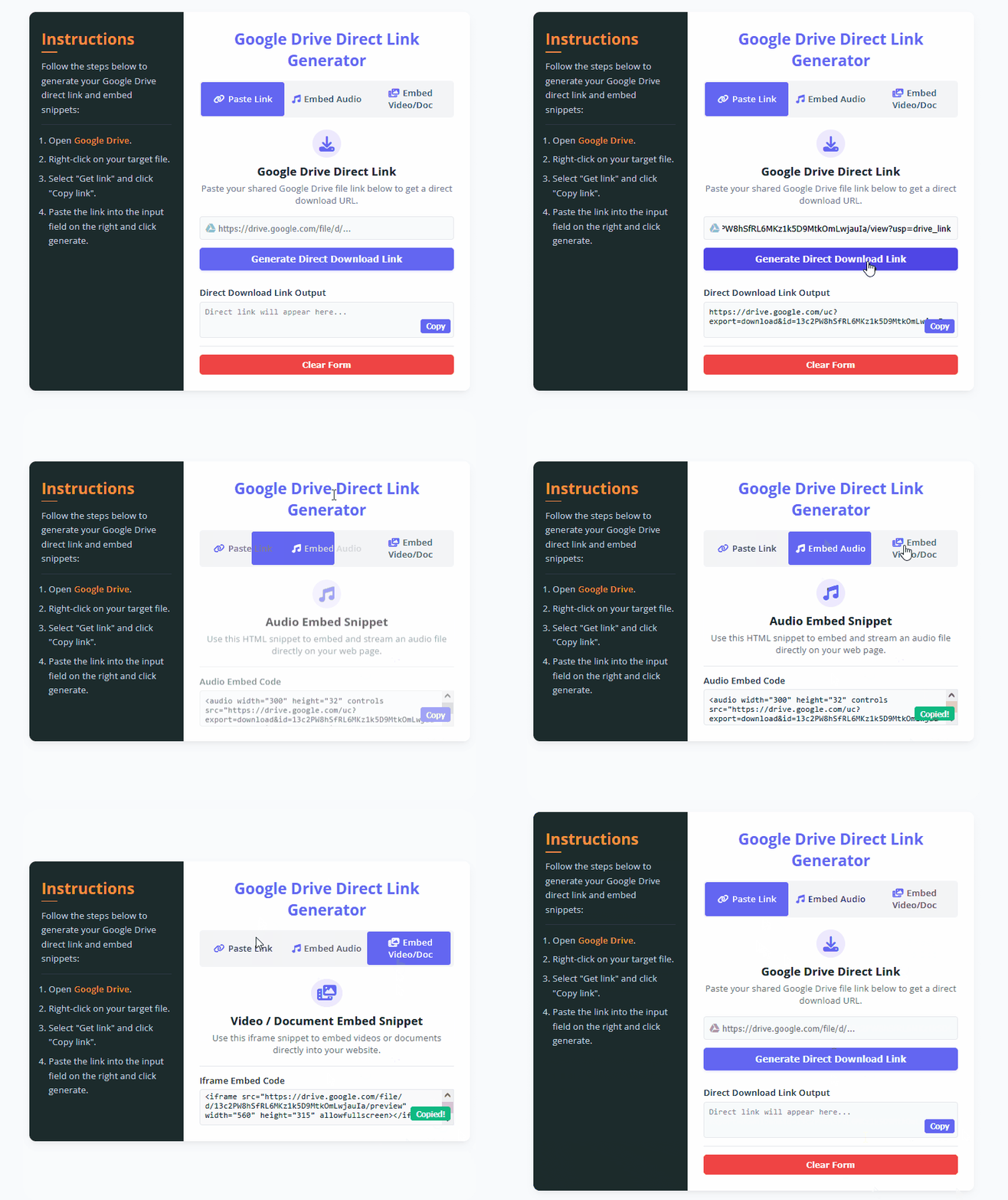
<!DOCTYPE html>
<html lang="en">
<head>
    <meta charset="UTF-8">
    <meta name="viewport" content="width=device-width, initial-scale=1.0">
    <title>Google Drive Direct Link & Embed Generator</title>
    <!-- FontAwesome CSS CDN for UI Icons -->
    <link rel="stylesheet" href="https://cdnjs.cloudflare.com/ajax/libs/font-awesome/6.4.0/css/all.min.css">
    <!-- Custom Stylesheet -->
    <link rel="stylesheet" href="styles.css">
</head>
<body>
    <main>
        <section class="main-container">

            <!-- Instructions Sidebar Panel -->
            <aside class="instructions">
                <div class="container-inner">
                    <h2 class="line">Instructions</h2>
                    <p>Follow the steps below to generate your Google Drive direct link and embed snippets:</p>
                    <hr>
                    <ol type="1">
                        <li><p>Open <a href="https://drive.google.com" target="_blank" rel="noopener">Google Drive</a>.</p></li>
                        <li><p>Right-click on your target file.</p></li>
                        <li><p>Select "Get link" and click "Copy link".</p></li>
                        <li><p>Paste the link into the input field on the right and click generate.</p></li>
                    </ol>
                </div>
            </aside>

            <!-- Main Generator Panel -->
            <div class="download-link">
                <div class="container-inner">
                    <h1>Google Drive Direct Link Generator</h1>

                    <!-- Hidden Radio Inputs for Tab Management -->
                    <input type="radio" id="tab-link" name="tab" checked>
                    <input type="radio" id="tab-audio" name="tab">
                    <input type="radio" id="tab-video" name="tab">

                    <!-- Navigation Tabs -->
                    <nav class="tab-nav">
                        <label for="tab-link" class="lbl-link"><i class="fas fa-link"></i>Paste Link</label>
                        <label for="tab-audio" class="lbl-audio"><i class="fas fa-music"></i>Embed Audio</label>
                        <label for="tab-video" class="lbl-video"><i class="fas fa-photo-video"></i>Embed Video/Doc</label>
                        <div class="slide"></div>
                    </nav>

                    <!-- Tab Content Container -->
                    <section class="tab-content-wrapper">

                        <!-- Tab 1: Direct Download Link -->
                        <div class="content content-link">
                            <div class="content-icon">
                                <i class="fas fa-download"></i>
                            </div>
                            <h2>Google Drive Direct Link</h2>
                            <p>Paste your shared Google Drive file link below to get a direct download URL.</p>

                            <form id="generator-form">
                                <div class="input-group">
                                    <i class="fab fa-google-drive"></i>
                                    <input type="url" id="glink" placeholder="https://drive.google.com/file/d/..." autocomplete="off" required>
                                </div>

                                <button type="submit" class="btn" id="btn">Generate Direct Download Link</button>

                                <div class="embed-code">
                                    <hr class="m-y">
                                    <h3>Direct Download Link Output</h3>
                                    <div class="textarea-wrapper">
                                        <textarea class="embed" id="download-link" readonly placeholder="Direct link will appear here..."></textarea>
                                        <button type="button" class="copy-btn" data-target="download-link">Copy</button>
                                    </div>
                                </div>
                                <hr class="m-y">
                                <button type="button" class="clear" id="clear-btn">Clear Form</button>
                            </form>
                        </div>

                        <!-- Tab 2: Audio Embed -->
                        <div class="content content-audio">
                            <div class="content-icon">
                                <i class="fas fa-music"></i>
                            </div>
                            <h2>Audio Embed Snippet</h2>
                            <p>Use this HTML snippet to embed and stream an audio file directly on your web page.</p>
                            <div class="embed-code">
                                <hr class="m-y">
                                <h3>Audio Embed Code</h3>
                                <div class="textarea-wrapper">
                                    <textarea class="embed" id="embed-audio" readonly placeholder="Audio embed code will appear after generating..."></textarea>
                                    <button type="button" class="copy-btn" data-target="embed-audio">Copy</button>
                                </div>
                            </div>
                        </div>

                        <!-- Tab 3: Video/Doc Embed -->
                        <div class="content content-video">
                            <div class="content-icon">
                                <i class="fas fa-photo-video"></i>
                            </div>
                            <h2>Video / Document Embed Snippet</h2>
                            <p>Use this iframe snippet to embed videos or documents directly into your website.</p>
                            <div class="embed-code">
                                <hr class="m-y">
                                <h3>Iframe Embed Code</h3>
                                <div class="textarea-wrapper">
                                    <textarea class="embed" id="embed-video" readonly placeholder="Video/Doc iframe code will appear here..."></textarea>
                                    <button type="button" class="copy-btn" data-target="embed-video">Copy</button>
                                </div>
                            </div>
                        </div>

                    </section>
                </div>
            </div>

        </section>
    </main>

    <!-- Custom JavaScript File -->
    <script src="script.js"></script>
</body>
</html>/* Google Fonts Import */
@import url('https://fonts.googleapis.com/css2?family=Open+Sans:wght@300;400;500;600;700&display=swap');
/* CSS Variables for Theme Configuration */
:root {
--white: #ffffff;
--black: #1c2b2d;
--primary: #6366f1;
--primary-hover: #4f46e5;
--color-sec: #f59e0b;
--color-grey: #f3f4f6;
--color-dark-grey: #1f2937;
--border-color: #e5e7eb;
}
/* Global Reset & Box Sizing */
* {
margin: 0;
padding: 0;
box-sizing: border-box;
}
body {
font-family: 'Open Sans', sans-serif;
background-color: #f8fafc;
color: var(--color-dark-grey);
min-height: 100vh;
display: flex;
align-items: center;
justify-content: center;
padding: 20px;
}
/* Main Wrapper Box */
main {
width: 100%;
max-width: 1100px;
background: var(--white);
border-radius: 16px;
box-shadow: 0 10px 25px -5px rgba(0, 0, 0, 0.05), 0 8px 10px -6px rgba(0, 0, 0, 0.05);
overflow: hidden;
}
.main-container {
display: flex;
width: 100%;
}
/* Instructions Panel Styling */
.instructions {
width: 35%;
background-color: var(--black);
color: #f1f5f9;
padding: 40px 30px;
display: flex;
flex-direction: column;
}
.instructions .container-inner {
width: 100%;
}
.instructions h2 {
font-size: 2.4rem;
color: var(--color-sec);
margin-bottom: 1rem;
}
.instructions p {
font-size: 1.4rem;
line-height: 1.6;
color: #cbd5e1;
}
.instructions hr {
border: none;
height: 1px;
background: #334155;
margin: 20px 0;
}
.instructions ol {
padding-left: 18px;
}
.instructions ol li {
font-size: 1.4rem;
margin-bottom: 12px;
color: #cbd5e1;
}
.instructions ol a {
color: var(--color-sec);
text-decoration: none;
font-weight: 600;
}
.instructions ol a:hover {
text-decoration: underline;
}
.line {
position: relative;
padding-bottom: 8px;
}
.line::after {
content: "";
position: absolute;
left: 0;
bottom: 0;
width: 40px;
height: 3px;
background-color: var(--color-sec);
border-radius: 2px;
}
/* Generator Form Panel Styling */
.download-link {
width: 65%;
padding: 40px;
background-color: var(--white);
}
.download-link .container-inner {
width: 100%;
}
.download-link h1 {
font-size: 2.4rem;
font-weight: 700;
color: var(--primary);
text-align: center;
margin-bottom: 25px;
}
/* Hide Radio Inputs */
input[type=radio] {
display: none;
}
/* Navigation Tab Switcher */
.tab-nav {
display: flex;
justify-content: space-between;
align-items: center;
background-color: var(--color-grey);
border-radius: 8px;
padding: 4px;
position: relative;
z-index: 1;
margin-bottom: 30px;
}
.tab-nav label {
flex: 1;
font-size: 1.4rem;
font-weight: 600;
padding: 12px;
text-align: center;
position: relative;
color: #4b5563;
cursor: pointer;
z-index: 2;
transition: color 0.3s ease;
}
.tab-nav label i {
margin-right: 8px;
color: var(--primary);
}
.tab-nav .slide {
position: absolute;
top: 4px;
left: 4px;
width: calc(33.333% - 4px);
height: calc(100% - 8px);
background-color: var(--primary);
border-radius: 6px;
z-index: 1;
transition: transform 0.35s cubic-bezier(0.4, 0, 0.2, 1);
}
/* Sliding Tab States */
#tab-audio:checked ~ nav .slide {
transform: translateX(100%);
}
#tab-video:checked ~ nav .slide {
transform: translateX(200%);
}
#tab-link:checked ~ nav label.lbl-link,
#tab-audio:checked ~ nav label.lbl-audio,
#tab-video:checked ~ nav label.lbl-video {
color: white;
}
#tab-link:checked ~ nav label.lbl-link i,
#tab-audio:checked ~ nav label.lbl-audio i,
#tab-video:checked ~ nav label.lbl-video i {
color: white;
}
/* Tab Content Visibility Management */
.content {
display: none;
}
#tab-link:checked ~ .tab-content-wrapper .content-link {
display: block;
animation: fadeIn 0.4s ease;
}
#tab-audio:checked ~ .tab-content-wrapper .content-audio {
display: block;
animation: fadeIn 0.4s ease;
}
#tab-video:checked ~ .tab-content-wrapper .content-video {
display: block;
animation: fadeIn 0.4s ease;
}
@keyframes fadeIn {
from { opacity: 0; transform: translateY(6px); }
to { opacity: 1; transform: translateY(0); }
}
/* Form Elements Styling */
.content-icon {
text-align: center;
margin-bottom: 15px;
}
.content-icon i {
font-size: 2.4rem;
color: var(--primary);
background-color: #ede9fe;
padding: 16px;
border-radius: 50%;
}
.content h2 {
font-size: 1.8rem;
text-align: center;
margin-bottom: 8px;
color: #111827;
}
.content p {
font-size: 1.4rem;
text-align: center;
color: #6b7280;
margin-bottom: 25px;
}
.input-group {
position: relative;
margin-bottom: 20px;
}
.input-group i {
position: absolute;
left: 15px;
top: 50%;
transform: translateY(-50%);
color: #9ca3af;
font-size: 1.6rem;
}
.input-group input {
width: 100%;
padding: 14px 16px 14px 45px;
font-size: 1.4rem;
border: 1px solid var(--border-color);
border-radius: 8px;
outline: none;
transition: all 0.3s;
background-color: #f9fafb;
}
.input-group input:focus {
border-color: var(--primary);
background-color: var(--white);
box-shadow: 0 0 0 3px rgba(99, 102, 241, 0.15);
}
.btn {
width: 100%;
padding: 14px;
font-size: 1.5rem;
font-weight: 600;
background-color: var(--primary);
color: white;
border: none;
border-radius: 8px;
cursor: pointer;
transition: background-color 0.3s, transform 0.2s;
box-shadow: 0 4px 6px -1px rgba(99, 102, 241, 0.2);
}
.btn:hover {
background-color: var(--primary-hover);
}
.btn:active {
transform: translateY(1px);
}
.m-y {
margin: 20px 0;
border: none;
height: 1px;
background-color: var(--border-color);
}
.embed-code h3 {
font-size: 1.4rem;
font-weight: 600;
margin-bottom: 8px;
color: #374151;
}
.textarea-wrapper {
position: relative;
}
.embed {
width: 100%;
height: 90px;
padding: 12px;
font-size: 1.3rem;
font-family: monospace;
border: 1px solid var(--border-color);
border-radius: 8px;
background-color: #f9fafb;
resize: none;
outline: none;
color: #1f2937;
}
.copy-btn {
position: absolute;
right: 8px;
bottom: 12px;
background-color: var(--primary);
color: white;
border: none;
padding: 6px 14px;
font-size: 1.2rem;
font-weight: 600;
border-radius: 6px;
cursor: pointer;
transition: background-color 0.2s;
}
.copy-btn:hover {
background-color: var(--primary-hover);
}
.clear {
width: 100%;
padding: 12px;
font-size: 1.4rem;
font-weight: 600;
background-color: #ef4444;
color: white;
border: none;
border-radius: 8px;
cursor: pointer;
transition: background-color 0.3s;
}
.clear:hover {
background-color: #dc2626;
}
/* Responsive Design for Mobile Devices */
@media screen and (max-width: 850px) {
body {
padding: 10px;
align-items: flex-start;
}
main {
border-radius: 10px;
margin: 10px 0;
}
.main-container {
flex-direction: column-reverse;
}
.instructions {
width: 100%;
padding: 30px 20px;
}
.download-link {
width: 100%;
padding: 30px 20px;
}
}/**
* Google Drive Direct Link & Embed Code Generator Script
* Handles URL parsing, direct link conversion, HTML embed generation,
* modern clipboard copy operations, and form resets.
*/
document.addEventListener("DOMContentLoaded", () => {
// DOM Element References
const gLink = document.getElementById("glink");
const form = document.getElementById("generator-form");
const downloadLink = document.getElementById("download-link");
const embedAudio = document.getElementById("embed-audio");
const embedVideo = document.getElementById("embed-video");
const clearBtn = document.getElementById("clear-btn");
/**
* Event Listener: Form Submission for Link Generation
* Triggers when the user clicks "Generate Direct Download Link"
*/
form.addEventListener("submit", (e) => {
e.preventDefault();
const urlValue = gLink.value.trim();
// Validate if the input string is a legitimate Google Drive shareable file link
if (urlValue.includes("https://drive.google.com/file/d/")) {
// 1. Generate Direct Download Link
// Replaces standard share URL structure with export download parameters
const directLink = urlValue
.replace("https://drive.google.com/file/d/", "https://drive.google.com/uc?export=download&id=")
.replace(/\/view.*$/, "");
downloadLink.value = directLink;
// 2. Generate Audio HTML Embed Snippet
const audioCode = `<audio width="300" height="32" controls src="${directLink}" type="audio/mpeg"></audio>`;
embedAudio.value = audioCode;
// 3. Generate Video / Document iframe Embed Snippet
const videoLink = urlValue.replace(/\/view.*$/, "");
const videoCode = `<iframe src="${videoLink}/preview" width="560" height="315" allowfullscreen></iframe>`;
embedVideo.value = videoCode;
} else {
alert("Invalid link format! Please enter a valid Google Drive file sharing link (e.g., https://drive.google.com/file/d/...).");
}
});
/**
* Event Listener: Universal Copy Button Handler
* Uses the modern Clipboard API to copy generated content and provides visual feedback.
*/
const copyButtons = document.querySelectorAll(".copy-btn");
copyButtons.forEach((btn) => {
btn.addEventListener("click", () => {
const targetId = btn.getAttribute("data-target");
const textarea = document.getElementById(targetId);
// Check if the textarea contains text before copying
if (!textarea.value.trim()) {
alert("No generated link or code available to copy yet!");
return;
}
// Write text to clipboard asynchronously
navigator.clipboard.writeText(textarea.value)
.then(() => {
const originalText = btn.textContent;
btn.textContent = "Copied!";
btn.style.backgroundColor = "#10b981"; // Temporary green success color
// Revert button text and color after 2 seconds
setTimeout(() => {
btn.textContent = originalText;
btn.style.backgroundColor = "";
}, 2000);
})
.catch(err => {
console.error("Failed to copy text: ", err);
alert("Failed to copy text to clipboard.");
});
});
});
/**
* Event Listener: Form Reset / Clear
* Clears all inputs and output textareas simultaneously.
*/
clearBtn.addEventListener("click", (e) => {
e.preventDefault();
gLink.value = "";
downloadLink.value = "";
embedAudio.value = "";
embedVideo.value = "";
});
});1. Brief Explanation of How the Code Works
- The Markup Structure (HTML): The interface uses clean semantic elements and hidden radio inputs to handle smooth tab-switching between the direct link generator, audio embed tool, and video/document iframe generator without heavy script overhead.
- The Styling & Layout (CSS): Styled using modern CSS custom properties (
:root) for flexible color management, sleek sliding tab animations, and a fully responsive layout that adapts gracefully to mobile devices. - The Core Logic (JavaScript): The script listens for form submissions, validates the Google Drive URL format, converts standard sharing links into direct download endpoints (
/uc?export=download&id=), and dynamically constructs HTML<audio>and<iframe>tags. - The Copy Mechanism: It leverages the modern
navigator.clipboard.writeText()API to copy generated code snippets directly to the clipboard, providing instant visual feedback (“Copied!”) on the button.
2. Important Notes & User-Editable Variables
If you want to customize this recipe for your own website or blog, here are the key variables and parameters you can modify:
- Theme Color Palette (
styles.css): You can easily update the primary and secondary colors by tweaking the CSS variables in the:rootblock, such as changing--primaryfor main buttons and--color-secfor highlights. - Player & Frame Dimensions (
script.js): The default dimensions for audio streams (width="300" height="32") and video/document iframes (width="560" height="315") can be adjusted directly within the JavaScript generation logic to match your layout requirements. - URL Validation Rule (
script.js): The validation stringincludes("[https://drive.google.com/file/d/](https://drive.google.com/file/d/)")ensures that the script only processes legitimate Google Drive file sharing links.