Whether you are building a unit conversion utility for an e-commerce platform, a fitness app, or simply sharpening your front-end developer skills, creating a multi-unit real-time converter is a classic project every web developer should master.
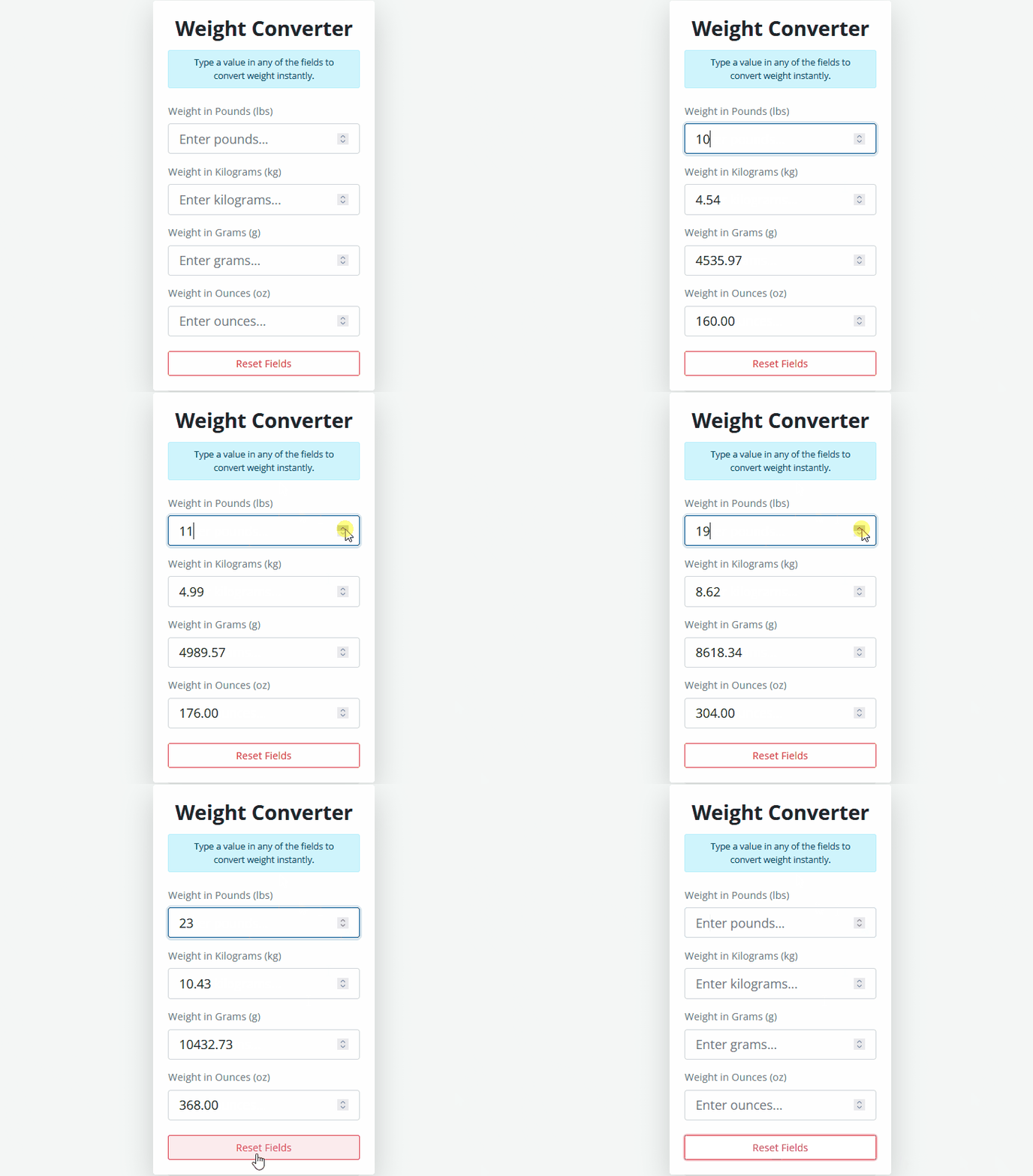
In this cookbook recipe, we will break down how to create a clean, responsive, and instant-updating Weight Converter using HTML5, CSS3, Bootstrap 5, and modern JavaScript.
<!DOCTYPE html>
<html lang="en">
  <head>
    <meta charset="UTF-8" />
    <meta name="viewport" content="width=device-width, initial-scale=1.0" />
    <title>Weight Converter Tutorial</title>
    <!-- Bootstrap CSS CDN for modern responsive styling -->
    <link
      href="https://cdn.jsdelivr.net/npm/bootstrap@5.0.0-beta2/dist/css/bootstrap.min.css"
      rel="stylesheet"
      integrity="sha384-BmbxuPwQa2lc/FVzBcNJ7UAyJxM6wuqIj61tLrc4wSX0szH/Ev+nYRRuWlolflfl"
      crossorigin="anonymous"
    />
    <link rel="stylesheet" href="styles.css" />
  </head>
  <body>
    <div class="container py-5">
      <div class="row d-flex justify-content-center">
        <div class="col-md-6 col-lg-5">
          <!-- Card Container for Clean UI -->
          <div class="card shadow-lg border-0 rounded-3 p-4 bg-white">
            <h1 class="text-center fw-bolder fs-2 text-dark mb-3">
              Weight Converter
            </h1>
            <p class="alert alert-info text-center small py-2 mb-4">
              Type a value in any of the fields to convert weight instantly.
            </p>
            <form id="converterForm">
              <!-- Pounds Input Field -->
              <div class="mb-3">
                <label class="form-label fw-semibold text-secondary">Weight in Pounds (lbs)</label>
                <input
                  type="number"
                  step="any"
                  class="form-control form-control-lg pounds"
                  placeholder="Enter pounds..."
                />
              </div>
              <!-- Kilograms Input Field -->
              <div class="mb-3">
                <label class="form-label fw-semibold text-secondary">Weight in Kilograms (kg)</label>
                <input
                  type="number"
                  step="any"
                  class="form-control form-control-lg kilograms"
                  placeholder="Enter kilograms..."
                />
              </div>
              <!-- Grams Input Field -->
              <div class="mb-3">
                <label class="form-label fw-semibold text-secondary">Weight in Grams (g)</label>
                <input
                  type="number"
                  step="any"
                  class="form-control form-control-lg grams"
                  placeholder="Enter grams..."
                />
              </div>
              <!-- Ounces Input Field -->
              <div class="mb-3">
                <label class="form-label fw-semibold text-secondary">Weight in Ounces (oz)</label>
                <input
                  type="number"
                  step="any"
                  class="form-control form-control-lg ounces"
                  placeholder="Enter ounces..."
                />
              </div>
              <!-- Reset Button to clear all inputs -->
              <button type="button" class="btn btn-outline-danger w-100 mt-2" id="resetBtn">
                Reset Fields
              </button>
            </form>
          </div>
        </div>
      </div>
    </div>

    <!-- Bootstrap Bundle JS -->
    <script
      src="https://cdn.jsdelivr.net/npm/bootstrap@5.0.0-beta2/dist/js/bootstrap.bundle.min.js"
      integrity="sha384-b5kHyXgcpbZJO/tY9Ul7kGkf1S0CWuKcCD38l8YkeH8z8QjE0GmW1gYU5S9FOnJ0"
      crossorigin="anonymous"
    ></script>
    <script src="script.js"></script>
  </body>
</html>/* Import Google Font 'Open Sans' */
@import url("https://fonts.googleapis.com/css2?family=Open+Sans:wght@300;400;600;700&display=swap");
:root {
--white: #fff;
--black: #1c2b2d;
--blue: #31326f;
--light-blue: #005490;
--color-primary: #9d0191;
--color-sec: #db6400;
--grey: #f4f7f6;
--dark-grey: #222831;
}
/* Global Reset & Box-Sizing */
* {
margin: 0;
padding: 0;
box-sizing: border-box;
}
/* Body Styling with Flexbox for vertical centering */
body {
background-color: var(--grey);
font-family: "Open Sans", sans-serif;
min-height: 100vh;
display: flex;
align-items: center;
}
/* Container max-width adjustment */
.container {
max-width: 900px;
margin: 0 auto;
}
/* Card hover/transition effect */
.card {
transition: transform 0.3s ease;
}
/* Custom focus ring color for inputs */
.form-control:focus {
border-color: var(--light-blue);
box-shadow: 0 0 0 0.25rem rgba(0, 84, 144, 0.15);
}/**
* Weight Converter Logic Script
* Handles real-time cross-conversion between Pounds, Kilograms, Grams, and Ounces.
*/
// Select input elements and form container from the DOM
const pounds = document.querySelector(".pounds"),
kilograms = document.querySelector(".kilograms"),
grams = document.querySelector(".grams"),
ounces = document.querySelector(".ounces"),
form = document.querySelector("form"),
resetBtn = document.querySelector("#resetBtn");
// Listen for 'input' events on the form container (Event Delegation)
form.addEventListener("input", convertWeight);
/**
* Main conversion function triggered on input change.
* Identifies which input field triggered the event and computes values for the other units.
* @param {Event} e - The input event object
*/
function convertWeight(e) {
let inputValue = parseFloat(e.target.value);
// Clear all fields if the input is empty or invalid
if (e.target.value === "" || isNaN(inputValue)) {
pounds.value = "";
kilograms.value = "";
grams.value = "";
ounces.value = "";
return;
}
// Check which unit is being typed into and calculate the rest
if (e.target.classList.contains("pounds")) {
// Conversion from Pounds (lbs)
kilograms.value = (inputValue / 2.2046).toFixed(2);
grams.value = (inputValue / 0.0022046).toFixed(2);
ounces.value = (inputValue * 16).toFixed(2);
} else if (e.target.classList.contains("kilograms")) {
// Conversion from Kilograms (kg)
pounds.value = (inputValue * 2.2046).toFixed(2);
grams.value = (inputValue * 1000).toFixed(2);
ounces.value = (inputValue * 35.274).toFixed(2);
} else if (e.target.classList.contains("grams")) {
// Conversion from Grams (g)
kilograms.value = (inputValue / 1000).toFixed(4);
pounds.value = (inputValue * 0.0022046).toFixed(4);
ounces.value = (inputValue * 0.035274).toFixed(2);
} else if (e.target.classList.contains("ounces")) {
// Conversion from Ounces (oz)
kilograms.value = (inputValue / 35.274).toFixed(4);
grams.value = (inputValue / 0.035274).toFixed(2);
pounds.value = (inputValue * 0.0625).toFixed(4);
}
}
/**
* Event listener for the Reset button.
* Clears all input field values when clicked.
*/
resetBtn.addEventListener("click", () => {
pounds.value = "";
kilograms.value = "";
grams.value = "";
ounces.value = "";
});🍳 How This Code Works: The Secret Sauce
Instead of attaching individual event listeners to every single input field, this recipe utilizes a powerful web development technique called Event Delegation.
Here is a quick step-by-step breakdown of what happens behind the scenes:
- Centralized Event Listener: We place a single
inputlistener on the parent<form>element. Whenever a user types into any of the four input fields (Pounds,Kilograms,Grams, orOunces), the event bubbles up to the form. - Dynamic Target Identification: Using
e.target.classList.contains(), JavaScript identifies which input field the user is currently typing in. - Instant Mathematical Calculations: Once the active unit is identified, the script reads its value, converts it into a floating-point number using
parseFloat(), and instantly calculates the values for the remaining three units using exact conversion multipliers. - Graceful Input Handling: If a user deletes their input or clears a field, the script catches
NaNor empty string states and instantly clears all fields to keep the UI clean. - Precision Formatting: Values are rounded cleanly using
.toFixed(2)(or.toFixed(4)for smaller decimal increments like Grams and Ounces) to keep the numbers readable and avoid long floating-point tail issues.
🔑 Important Variables & Customization Notes
When tweaking or expanding this code for your own projects, keep these key variables, parameters, and classes in mind:
1. Conversion Multipliers & Formulas
If you want to adjust precision or add more units (like Milligrams or Stones), here are the core math formulas used in script.js:
- Pounds (lbs) Base:
- Kilograms =
Pounds / 2.2046 - Grams =
Pounds / 0.0022046 - Ounces =
Pounds * 16
- Kilograms =
- Kilograms (kg) Base:
- Pounds =
Kilograms * 2.2046 - Grams =
Kilograms * 1000 - Ounces =
Kilograms * 35.274
- Pounds =
2. Precision Settings (.toFixed())
- Where to find it: Inside
script.jswithinconvertWeight(). - How to change it: Adjust
.toFixed(2)to.toFixed(3)or higher if your project requires greater scientific accuracy rather than standard rounded display values.
3. CSS Theme Colors (:root Variables)
- Where to find it: At the top of
styles.css. - How to change it: Modify
--light-blueor--greyto align the card highlight and focus rings with your website’s custom color palette:
:root {
  --light-blue: #005490; /* Focus ring & highlight color */
  --grey: #f4f7f6;       /* Page background color */
}4. Input Class Names
- Where to find it:
index.htmlandscript.js. - Important: The class names assigned to the
<input>elements (.pounds,.kilograms,.grams,.ounces) must match the class checks insidescript.js(e.target.classList.contains("pounds")). If you rename a class in HTML, remember to update it in JavaScript as well!