
Welcome to another web development recipe! If you are looking to build a clean, responsive, and fully functional notes application without relying on heavy frontend frameworks, this “cookbook” tutorial is for you.
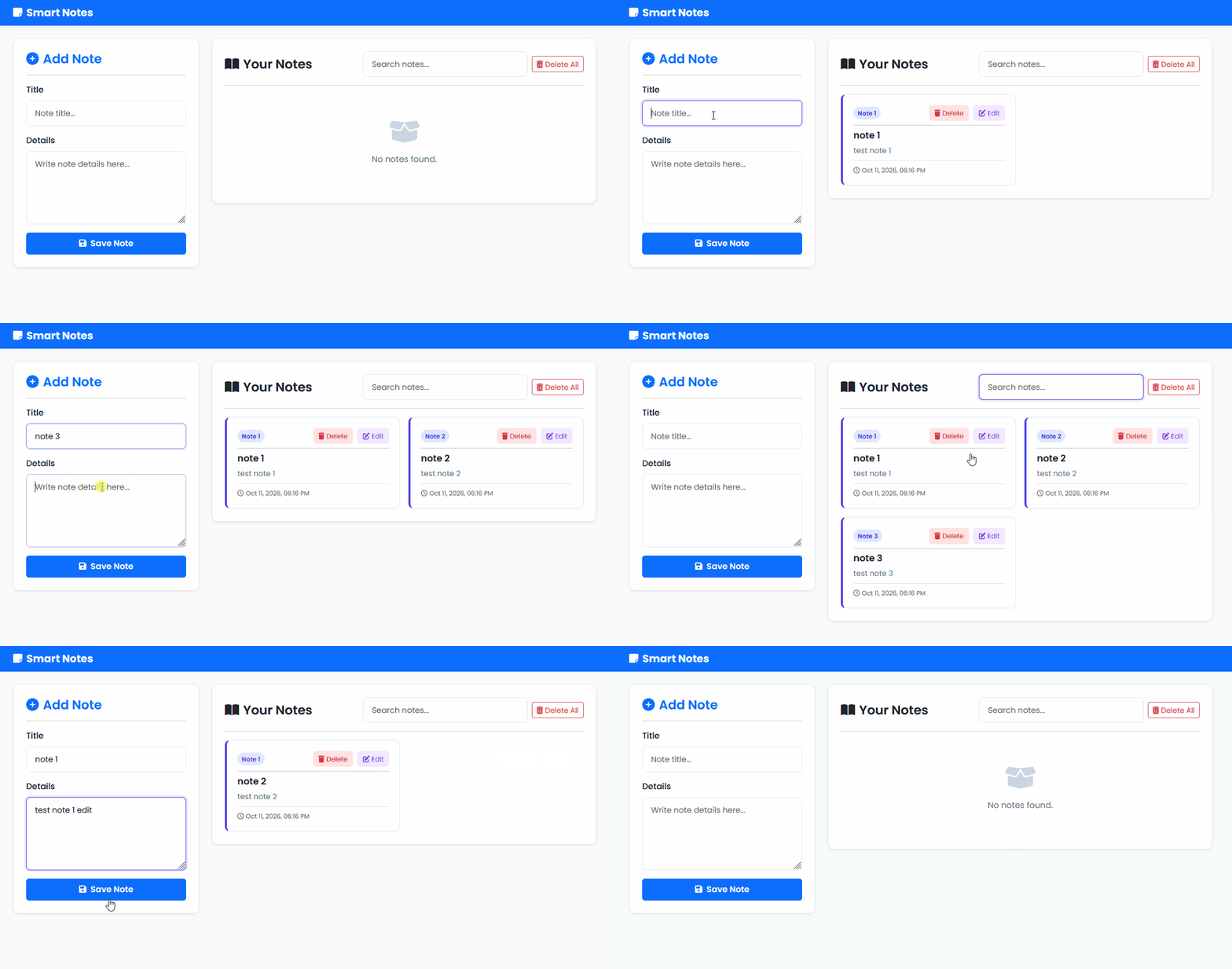
Below, we’ll break down how to create a sleek Smart Notes App powered by Bootstrap 5, modern CSS variables, and native JavaScript.
<!DOCTYPE html>
<html lang="en">
  <head>
    <meta charset="UTF-8" />
    <meta name="viewport" content="width=device-width, initial-scale=1.0" />
    <title>Smart Notes App</title>
    <!-- FontAwesome Icons -->
    <link
      rel="stylesheet"
      href="https://cdnjs.cloudflare.com/ajax/libs/font-awesome/6.4.0/css/all.min.css"
    />
    <!-- Bootstrap 5 CSS -->
    <link
      href="https://cdn.jsdelivr.net/npm/bootstrap@5.3.3/dist/css/bootstrap.min.css"
      rel="stylesheet"
      integrity="sha384-QWTKZyjpPEjISv5WaRU9OFeRpok6YctnYmDr5pNlyT2bRjXh0JMhjY6hW+ALEwIH"
      crossorigin="anonymous"
    />
    <link rel="stylesheet" href="styles.css" />
  </head>
  <body>
    <!-- Navbar Header -->
    <header>
      <nav class="navbar navbar-dark bg-primary shadow-sm">
        <div class="container">
          <span class="navbar-brand mb-0 h1 fw-bold">
            <i class="fas fa-note-sticky me-2"></i>Smart Notes
          </span>
        </div>
      </nav>
    </header>

    <!-- Main Application Container -->
    <main class="container my-4">
      <div class="row g-4">
        <!-- Form Container for Adding Notes -->
        <div class="col-lg-4">
          <div class="form-card shadow-sm p-4 rounded bg-white">
            <h2 class="h4 mb-3 fw-semibold text-primary">
              <i class="fas fa-plus-circle me-2"></i>Add Note
            </h2>
            <hr class="mb-3" />
            <form id="note-form">
              <div class="mb-3">
                <label for="note-title" class="form-label fw-medium">Title</label>
                <input
                  type="text"
                  id="note-title"
                  class="form-control"
                  placeholder="Note title..."
                  required
                />
              </div>
              <div class="mb-3">
                <label for="note-text" class="form-label fw-medium">Details</label>
                <textarea
                  id="note-text"
                  class="form-control"
                  rows="5"
                  placeholder="Write note details here..."
                  required
                ></textarea>
              </div>
              <button id="add-btn" class="btn btn-primary w-100 py-2 fw-semibold">
                <i class="fas fa-save me-2"></i>Save Note
              </button>
            </form>
          </div>
        </div>

        <!-- Notes Display Container -->
        <div class="col-lg-8">
          <div class="notes-wrapper shadow-sm p-4 rounded bg-white">
            <div class="notes-header d-flex flex-column flex-sm-row justify-content-between align-items-sm-center gap-3 mb-3">
              <h2 class="h4 mb-0 fw-semibold text-dark">
                <i class="fas fa-book-open me-2"></i>Your Notes
              </h2>
              <div class="d-flex gap-2 align-items-center">
                <input
                  type="text"
                  id="search-input"
                  class="form-control form-control-sm"
                  placeholder="Search notes..."
                />
                <button class="btn btn-outline-danger btn-sm clear text-nowrap">
                  <i class="fas fa-trash-alt me-1"></i>Delete All
                </button>
              </div>
            </div>
            <hr class="mb-3" />

            <div id="notes" class="row g-3">
              <!-- Dynamic notes will be rendered here -->
            </div>
          </div>
        </div>
      </div>
    </main>

    <script src="script.js"></script>
  </body>
</html>/* Import Google Font - Poppins */
@import url("https://fonts.googleapis.com/css2?family=Poppins:wght@300;400;500;600;700&display=swap");
/* CSS Variables for Global Theming */
:root {
--primary-color: #4f46e5;
--primary-hover: #4338ca;
--bg-color: #f8fafc;
--card-bg: #ffffff;
--text-main: #1e293b;
--text-muted: #64748b;
--border-color: #e2e8f0;
}
/* Global Reset & Base Styles */
* {
margin: 0;
padding: 0;
box-sizing: border-box;
}
body {
font-family: "Poppins", sans-serif;
background-color: var(--bg-color);
color: var(--text-main);
min-height: 100vh;
}
/* Card Container Styling with Soft Shadows */
.form-card,
.notes-wrapper {
background-color: var(--card-bg);
border: 1px solid var(--border-color);
border-radius: 12px !important;
transition: all 0.3s ease;
}
/* Form Inputs & Textarea Styling */
.form-control {
border-color: var(--border-color);
padding: 0.75rem 1rem;
font-size: 0.95rem;
border-radius: 8px;
}
.form-control:focus {
border-color: var(--primary-color);
box-shadow: 0 0 0 3px rgba(79, 70, 229, 0.15);
}
/* Individual Note Card Styling */
.note {
background: var(--card-bg);
border: 1px solid var(--border-color);
border-left: 4px solid var(--primary-color);
padding: 1.25rem;
border-radius: 10px;
box-shadow: 0 2px 4px rgba(0, 0, 0, 0.02);
transition: transform 0.2s ease, box-shadow 0.2s ease;
}
.note:hover {
transform: translateY(-2px);
box-shadow: 0 6px 12px rgba(0, 0, 0, 0.05);
}
.note-cta {
display: flex;
justify-content: space-between;
align-items: center;
margin-bottom: 0.5rem;
}
.note-counter {
font-size: 0.75rem;
background-color: #e0e7ff;
color: var(--primary-color);
padding: 3px 8px;
font-weight: 600;
border-radius: 20px;
margin: 0;
}
.note-cta-btn {
display: flex;
gap: 0.5rem;
}
.note-btn {
padding: 0.35rem 0.65rem;
font-size: 0.8rem;
border-radius: 6px;
border: none;
cursor: pointer;
display: inline-flex;
align-items: center;
gap: 4px;
transition: background-color 0.2s;
}
.note-btn:not(.edit-btn) {
background-color: #fee2e2;
color: #dc2626;
}
.note-btn:not(.edit-btn):hover {
background-color: #fecaca;
}
.edit-btn {
background-color: #f3e8ff;
color: #7c3aed;
}
.edit-btn:hover {
background-color: #e9d5ff;
}
.note-title {
font-size: 1.1rem;
font-weight: 600;
color: var(--text-main);
margin-bottom: 0.5rem;
}
.note-text {
font-size: 0.9rem;
color: var(--text-muted);
white-space: pre-wrap;
word-break: break-word;
margin-bottom: 0;
}
/* Empty State Styling */
.empty-state {
text-align: center;
padding: 3rem 1rem;
color: var(--text-muted);
}
.empty-state i {
font-size: 3rem;
margin-bottom: 1rem;
color: #cbd5e1;
}// DOM Element References
const noteBtn = document.getElementById("add-btn"),
noteTitle = document.getElementById("note-title"),
noteText = document.getElementById("note-text"),
clear = document.querySelector(".clear"),
searchInput = document.getElementById("search-input");
/**
* Retrieve notes from LocalStorage.
* Returns an empty array if no notes are found.
*/
function getNotes() {
let notes = localStorage.getItem("notes");
return notes === null ? [] : JSON.parse(notes);
}
/**
* Event Listener for adding a new note.
* Validates inputs, creates a note object with title, text, and timestamp,
* saves it to LocalStorage, resets the form, and updates the display.
*/
noteBtn.addEventListener("click", (e) => {
e.preventDefault();
// Input validation
if (noteTitle.value.trim() === "" || noteText.value.trim() === "") {
alert("Please fill in both the note title and details!");
return;
}
let notesObj = getNotes();
let myObj = {
title: noteTitle.value.trim(),
text: noteText.value.trim(),
date: new Date().toLocaleDateString("en-US", {
day: 'numeric',
month: 'short',
year: 'numeric',
hour: '2-digit',
minute: '2-digit'
})
};
notesObj.push(myObj);
localStorage.setItem("notes", JSON.stringify(notesObj));
// Reset form and refresh display
document.getElementById("note-form").reset();
showNotes();
});
/**
* Display notes on the page.
* Supports real-time filtering based on search input.
* @param {string} filter - Keyword to filter notes by title or content.
*/
function showNotes(filter = "") {
let notesObj = getNotes();
let html = "";
// Filter notes based on search query
const filteredNotes = notesObj.filter(
(element) =>
element.title.toLowerCase().includes(filter.toLowerCase()) ||
element.text.toLowerCase().includes(filter.toLowerCase())
);
if (filteredNotes.length !== 0) {
filteredNotes.forEach((element) => {
// Find the original index of the note in the main array
const originalIndex = notesObj.findIndex(n => n === element);
html += `
<div class="col-md-6">
<div class="note h-100 d-flex flex-column justify-content-between">
<div>
<div class="note-cta">
<span class="note-counter">Note ${originalIndex + 1}</span>
<div class="note-cta-btn">
<button onclick="deleteNote(${originalIndex})" class="note-btn">
<i class="fas fa-trash"></i> Delete
</button>
<button onclick="editNote(${originalIndex})" class="note-btn edit-btn">
<i class="fas fa-edit"></i> Edit
</button>
</div>
</div>
<hr class="my-2" />
<h3 class="note-title">${escapeHTML(element.title)}</h3>
<p class="note-text">${escapeHTML(element.text)}</p>
</div>
${element.date ? `<small class="text-muted mt-2 pt-2 border-top d-block" style="font-size: 0.75rem;"><i class="far fa-clock me-1"></i>${element.date}</small>` : ''}
</div>
</div>
`;
});
} else {
html = `
<div class="col-12">
<div class="empty-state">
<i class="fas fa-box-open"></i>
<p class="mb-0">No notes found.</p>
</div>
</div>
`;
}
let noteElm = document.getElementById("notes");
noteElm.innerHTML = html;
}
// Real-time search event listener
searchInput.addEventListener("input", (e) => {
showNotes(e.target.value);
});
/**
* Delete a single note by its index after confirmation.
* @param {number} index - Index of the note in the array.
*/
function deleteNote(index) {
let confirmDel = confirm("Are you sure you want to delete this note?");
if (confirmDel) {
let notesObj = getNotes();
notesObj.splice(index, 1);
localStorage.setItem("notes", JSON.stringify(notesObj));
showNotes(searchInput.value);
}
}
/**
* Delete all notes from LocalStorage after confirmation.
*/
clear.addEventListener("click", () => {
let notesObj = getNotes();
if (notesObj.length === 0) {
alert("No notes available to delete.");
return;
}
let confirmClear = confirm("Are you sure you want to delete ALL notes?");
if (confirmClear) {
localStorage.clear();
showNotes();
}
});
/**
* Edit an existing note.
* Loads the note data back into the form inputs and removes it from storage
* so it can be re-saved upon editing.
* @param {number} index - Index of the note to edit.
*/
function editNote(index) {
if (noteTitle.value.trim() !== "" || noteText.value.trim() !== "") {
let proceed = confirm("The form is currently filled. Editing will overwrite current form inputs. Proceed?");
if (!proceed) return;
}
let notesObj = getNotes();
noteTitle.value = notesObj[index].title;
noteText.value = notesObj[index].text;
notesObj.splice(index, 1);
localStorage.setItem("notes", JSON.stringify(notesObj));
showNotes(searchInput.value);
// Scroll smoothly to top of page
window.scrollTo({ top: 0, behavior: 'smooth' });
}
/**
* Helper function to sanitize user input and prevent XSS attacks.
* @param {string} str - Raw input string.
* @returns {string} - Sanitized HTML-safe string.
*/
function escapeHTML(str) {
return str
.replace(/&/g, "&")
.replace(/</g, "<")
.replace(/>/g, ">")
.replace(/"/g, """)
.replace(/'/g, "'");
}
// Initial call to render notes on page load
showNotes();🛠️ How the Code Works
This application is split into three core layers that work seamlessly together:
- The Structure (
index.html)- Built using Bootstrap 5.3 grid system, ensuring a responsive layout that looks great on mobile devices and desktops alike.
- Features a split-screen design: a sidebar form for adding/editing notes on the left and a dynamic display container with a real-time search bar on the right.
- Integrates FontAwesome icons to give buttons a polished, professional UI look.
- The Style (
styles.css)- Uses the Google Font Poppins for a clean, modern typography.
- Implements CSS Variables (
:root) for effortless global color management. - Adds smooth hover transitions, subtle box-shadows, and a signature left-border accent on each note card.
- The Logic (
script.js)- LocalStorage Persistence: Automatically saves, updates, and deletes notes using the browser’s
localStorageso data remains even after a page refresh. - Real-Time Search: Instantly filters notes as the user types into the search input field without needing a page reload.
- CRUD Operations: Handles creating, editing, deleting individual notes, and clearing all records with confirmation alerts.
- Security (XSS Prevention): Includes an
escapeHTML()helper function to sanitize user input and prevent Cross-Site Scripting vulnerabilities.
- LocalStorage Persistence: Automatically saves, updates, and deletes notes using the browser’s
⚙️ Important Notes: Variables & Customization
If you want to tweak or adapt this recipe for your own projects, here are the key variables and parameters you can easily modify:
- Theme Colors (
styles.css–:root): You can change the primary brand color by modifying the--primary-colorvariable (default is set to a sleek indigo#4f46e5). Changing this will automatically update buttons, borders, and card accents. - Storage Key (
script.js–localStorage): The storage key is currently set to"notes"(localStorage.getItem("notes")). If you plan to host multiple note-taking tools on the same domain, change this string to a unique name (e.g.,"smartNotesData") to prevent data overlapping. - Date & Time Locale (
script.js–toLocaleDateString): The timestamp format relies on JavaScript’stoLocaleDateString. You can change"en-US"to your preferred locale code (such as"id-ID"for Indonesian) if you want localized date formatting. - Form Validation Fields: The
add-btnevent listener checks if both the title and text inputs are filled (noteTitle.value.trim() === ""ornoteText.value.trim() === ""). You can remove therequiredchecks or add length restrictions here depending on your specific use case.